
Screenshots
Low risk impact
Is Foxit PDF Creator Chrome extension safe?
The Foxit PDF Creator Chrome extension is considered low risk. It only requests basic permissions that do not broadly expose your personal data or browsing history. It is generally safe to install.
Our Recommendation: Safe to install.
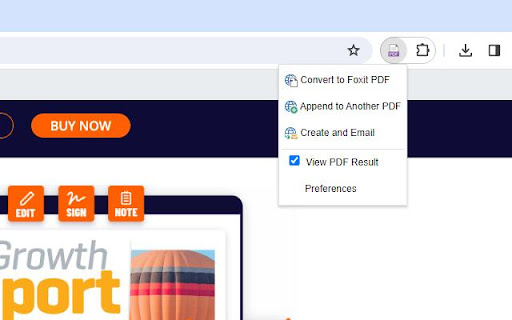
Saving a full web article or online recipe without losing the formatting is a constant challenge. Foxit PDF Creator simplifies this task by letting you convert web pages into structured PDF documents right from your toolbar.
This browser tool is designed for professionals and students who need to archive web content, save online receipts, or prepare research documents without copy-pasting text into a word processor.
Customizing Your Webpage Conversions
Unlike basic print-to-PDF functions, this extension provides control over the output document. Before you create a file, you can customize page layouts, adjust margins, and insert custom headers and footers to keep your documents organized.
If you want to know how to save webpage as pdf foxit handles it by giving you layout options directly inside your browser settings. You can also add watermarks for document security or apply encryption permissions so that sensitive web exports remain protected.
How It Compares to Foxit PDF Editor Integration
It is important to note that this extension acts as a bridge. Foxit PDF Creator requires Foxit PDF Editor installed on your desktop to complete the conversion process. When comparing Foxit vs Adobe Acrobat Chrome extension options, Foxit relies on its companion desktop program to execute advanced layout rendering and security settings.
While this extra requirement means it is not a standalone tool, users who already rely on Foxit Software for their daily document workflow will appreciate the direct integration.
Key Capabilities and Options
- Convert full web pages into PDF files with a single click.
- Adjust page layout parameters like margins, orientation, and size.
- Add custom headers and footers to keep track of source URLs and dates.
- Apply visual watermarks across exported pages for branding or security.
- Solves convert webpage to pdf chrome tasks with built-in encryption settings.
- Protect generated documents with password and security permissions.
Pros and Cons
- Direct integration with desktop software.
- Offers advanced layout and security controls.
- Custom header, footer, and watermark support.
- Requires Foxit PDF Editor desktop application to function.
- Higher learning curve than standard print-to-PDF options.
Add Foxit PDF Creator to Chrome
The Foxit PDF Creator Chrome extension is available on the Chrome Web Store for users who want a quick way to archive online content. It also works seamlessly on other Chromium-based browsers such as Microsoft Edge or Brave. You can download the Foxit PDF Creator Chrome extension and start converting web pages directly from your browser toolbar today.