
Screenshots

Low risk impact
Is iCloud Bookmarks Chrome extension safe?
The iCloud Bookmarks Chrome extension is considered low risk. It only requests basic permissions that do not broadly expose your personal data or browsing history. It is generally safe to install.
Our Recommendation: Safe to install.
Keeping your online life organized across different operating systems can be a constant struggle. If you use Safari on an iPhone or iPad but prefer Google Chrome on your Windows laptop or desktop, keeping your favorite websites aligned usually requires manual copy-pasting.
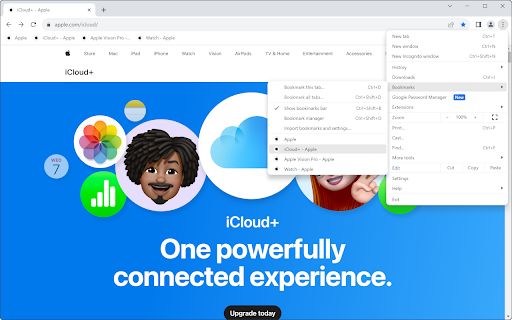
iCloud Bookmarks bridges this gap by automatically updating your saved websites across all your devices. Whether you save a site on your Mac, iPhone, or Windows PC, this Chrome add-on ensures your collection stays uniform everywhere without requiring manual exports.
How Bookmarks Stay Updated Across Your Devices
When you use multiple devices throughout the day, having access to the same web resources saves significant time. If you have been searching for how to sync safari bookmarks with chrome without relying on third-party cloud services, this tool handles the background work natively.
Once connected, any site added to your browser on iOS or macOS appears in your Chrome browser on Windows. Similarly, saving a site in Chrome sends it straight back to your Safari collection. This bi-directional syncing ensures you never lose track of an important link when switching devices.
iCloud Bookmarks vs xBrowserSync and Native Options
While third-party tools like xBrowserSync offer browser integration across platforms, this official release from Apple Inc. connects directly into the Apple ecosystem. It relies on the official iCloud infrastructure rather than secondary servers, making it the most direct choice for Apple hardware owners.
To run this Chrome add-on properly on a PC, you must have iCloud for Windows installed on your system. The extension acts as a bridge between your local Windows desktop app and the Google Chrome browser, keeping your account preferences aligned across both platforms.
Key Capabilities and Functional Features
- Syncs your Safari links directly into Google Chrome on Windows PCs.
- Updates new bookmarks automatically whenever you add a site on an iPhone or iPad.
- Sends Chrome bookmarks back to your Apple account in real time.
- Maintains your existing folder structure so your organized links stay intact.
- Solves how to sync safari bookmarks with chrome with minimal ongoing setup.
- Integrates directly with the official iCloud for Windows companion app.
Practical Pros and Considerations
- Built directly by Apple Inc. for official system compatibility.
- Operates silently in the background without pop-ups or heavy resource usage.
- Helps maintain a seamless browsing flow between mobile iOS devices and desktop PCs.
- Requires the desktop iCloud for Windows program to function properly.
- Sync speed depends on your overall iCloud network connection.
Get iCloud Bookmarks for Your Browser
You can download the iCloud Bookmarks Chrome extension directly from the Chrome Web Store at no cost. It runs smoothly on Chrome as well as other Chromium-based browsers like Microsoft Edge or Brave, provided you have iCloud for Windows set up on your machine. Add iCloud Bookmarks to Chrome today to keep your saved websites completely synced across every screen you use.