
Screenshots
Low risk impact
Is React Developer Tools Chrome extension safe?
The React Developer Tools Chrome extension is considered low risk. It only requests basic permissions that do not broadly expose your personal data or browsing history. It is generally safe to install.
Our Recommendation: Safe to install.
Building modern web applications often means managing deeply nested components and fast-changing state. Trying to debug these structures using standard browser inspection tools can quickly lead to headache after headache. React Developer Tools bridges that gap by giving software creators direct visibility into their component trees and render behavior.
Created by the team at Meta, this browser tool integrates directly into your existing developer suite. Rather than sifting through plain HTML elements, you can view the actual component names, active props, and current state of any React application running on the page.
How React DevTools Works in Daily Workflows
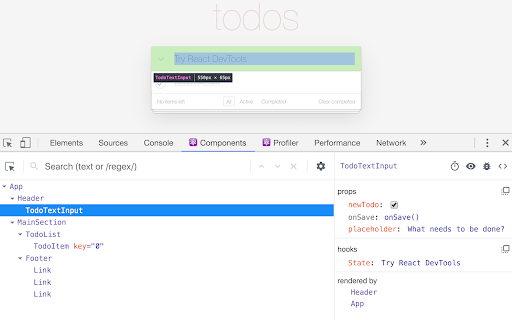
Once installed, this extension adds two dedicated panels to your main browser inspection interface: the Components panel and the Profiler panel. These tools mirror the exact architecture of your code, making it easy to trace how data flows from root nodes down to smaller child elements.
When you click on any element using the standard element picker and switch over to the React view, the corresponding item is highlighted automatically. The right-hand panel gives you instant access to inspect and edit props on the fly, which is ideal when testing quick visual changes or fixing unexpected state bugs.
How to Inspect React Components in Chrome Efficiently
If you have been wondering how to inspect react components in chrome without adding extra console logs everywhere, this add-on handles it seamlessly. You can jump through breadcrumbs to see which component rendered what, trace parent-child relationships, and isolate performance bottlenecks.
For performance tuning, the built-in profiler lets you record rendering sessions. It highlights which components re-rendered, how long each render took, and why the update occurred, helping you eliminate unnecessary updates before shipping to production.
Key Features of React Developer Tools
- Inspect complete component hierarchies with dedicated Components and Profiler panels.
- Edit props and state live in the browser panel to test fixes instantly.
- Track parent-child relationships easily using interactive breadcrumb trails.
- Debug react props and state chrome extension views by syncing directly with the standard browser Elements panel.
- Record live performance sessions to profile react performance in browser renders.
- Solves how to inspect react components in chrome by providing clean visual trees instead of messy raw DOM nodes.
Pros and Cons
- Directly integrates with standard browser Developer Tools.
- Fully open-source project maintained by Meta and the open-source community.
- Requires no remote data transmission, keeping your local data private.
- Only active on websites that run React in development or readable production modes.
- Requires basic understanding of React concepts to utilize effectively.
Comparing React Developer Tools vs Redux DevTools
Developers often compare React Developer Tools vs Redux DevTools when setting up their environment. While Redux tools focus specifically on global state changes and action dispatch history, this tool focuses on component structure, local state, and render performance. Using both together offers a complete view of application health.
Safety, Permissions, and Open Source Integrity
Because privacy is essential when choosing developer plugins, it is reassuring that this extension operates entirely locally. It requires permissions to access the active page's component tree so it can read props and state, but it does not send data to any external server. Its complete source code is publicly accessible on GitHub, allowing developers to inspect and contribute to the code base.
Add React Developer Tools to Chrome
You can add React Developer Tools to Chrome for free directly from the official web store. It also works seamlessly on other Chromium-based browsers, such as Microsoft Edge or Brave.
Download React Developer Tools Chrome extension to debug react props and state chrome extension setups directly from your browser toolbar today.


