
Screenshots



Low risk impact
Is Google Input Tools Chrome extension safe?
The Google Input Tools Chrome extension is considered low risk. It only requests basic permissions that do not broadly expose your personal data or browsing history. It is generally safe to install.
Our Recommendation: Safe to install.
Writing emails, filling out forms, or chatting with family in your native language can get frustrating when your physical keyboard only has English letters. Google Input Tools solves this everyday hassle by giving you virtual keyboards, script transliteration, and mouse handwriting right inside your web browser.
Whether you are learning a new language, corresponding with overseas colleagues, or simply prefer typing phonetically, this Chrome add-on gives you access to dozens of scripts without installing complex system language packs. It turns your standard keyboard into a versatile multilingual hub with just a couple of adjustments in your options menu.
Setting Up Your Language Preferences
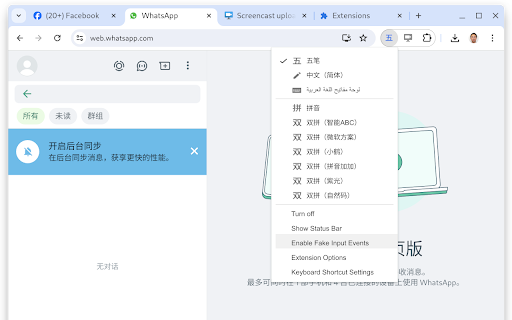
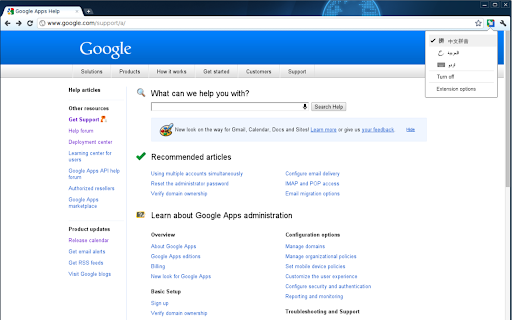
When you first install the browser tool, click its icon in your toolbar and head into the options menu. Here, you can build a personalized list of preferred scripts from a pool of over 90 virtual keyboards, 30 transliteration tools, and 40 handwriting panels. Once you pick your main options, you can toggle between them instantly without visiting the setup page again.
Selecting a tool from the drop-down menu activates it for the active text box on your screen. Turning off the feature requires a quick click on the main icon, restoring your default computer keyboard layout immediately.
Phonetic Transliteration and Handwriting Modes
If you want to know how to type in hindi on chrome without learning a whole new keyboard layout, the built-in phonetic transliteration mode is the easiest solution. You type words using English letters based on how they sound, and the software automatically converts those letters into the target script. Typing phonetic characters brings up a small selection bar where pressing the spacebar picks the top matching script word.
For languages with intricate characters or non-Latin alphabets, you can switch to the drawing pad interface. Using a mouse or trackpad, you draw characters directly onto a small pop-up box. The extension recognizes the strokes in real time and presents a selection list of corresponding characters to insert directly into your text box.
How It Compares to Gboard and Other Systems
When evaluating Google Input Tools vs Gboard or built-in operating system language packs, the main advantage of this browser tool is convenience. Instead of changing global system settings that affect your entire computer, this extension only manages input inside your active web browser windows. It also provides automatic spell correction and diacritics for Latin-script languages, completing words with accents when you press space or tab.
Essential Typing Features
- Provides virtual keyboard layouts for over 90 different global languages.
- Includes a virtual keyboard chrome extension interface to click keys directly on your screen.
- Offers handwriting input tool browser capabilities for drawing characters by hand.
- Supports automatic spell correction and accent completion for Latin-script languages.
- Uses custom keyboard shortcuts like ALT+SHIFT+N to switch tools without touching the mouse.
- Remembers your selected language preferences across all your browsing tabs.
Known Web Page Limits
Because of built-in web safety controls in Google Chrome, the extension cannot capture text input inside the address bar, on the official Chrome Web Store, or within other browser extensions. It also will not function inside older media platforms like Flash applications. For standard web pages, online forms, and email clients, it works smoothly.
Pros and Cons
- Broad language support across dozens of scripts
- Easy switching between mouse drawing, phonetic typing, and virtual layouts
- Handy keyboard shortcuts for quick language changes
- Does not work inside the browser address bar or Web Store pages
- Requires initial setup to choose preferred language tools
Add Google Input Tools to Chrome
The Google Input Tools Chrome extension is available for free — click the button on the Web Store to add it and start typing in any language right away. You can download the tool on standard Chromium browsers, including Microsoft Edge or Brave, giving you full typing flexibility across different online platforms.
