
Screenshots


Low risk impact
Is Google Translate Chrome extension safe?
The Google Translate Chrome extension is considered low risk. It only requests basic permissions that do not broadly expose your personal data or browsing history. It is generally safe to install.
Our Recommendation: Safe to install.
Highlighting foreign text and copying it into a new tab gets tiring very quickly when reading international news or working across languages. Google Translate solves this by bringing instant translations directly onto your active webpage with a single click.
Google Translate is a lightweight browser extension that lets you understand foreign words without abandoning your current reading workflow. While newer versions of Chrome feature built-in page translation, this dedicated browser tool focuses specifically on quick snippet selection, individual word definitions, and inline reading assistance.
How Inline Snippet Translation Works
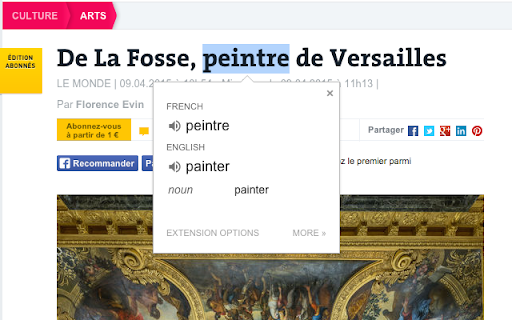
When reading an article or document in a foreign language, you often only need help with a single sentence or tricky word. This Chrome add-on attaches a small icon right next to any text you select. Clicking that icon opens an instant pop-up box with the direct translation into your primary language.
If you want an even faster workflow, you can adjust the options to automatically trigger the translation pop-up every single time you highlight text. This is especially helpful for language learners who want continuous assistance while browsing foreign blogs, documentation, or social feeds.
How It Compares to DeepL and Other Chrome Extensions
When considering alternatives like the DeepL Chrome extension, Google Translate stands out primarily due to its massive language support and simple user experience. While competing extensions sometimes offer different phrasing suggestions, this tool benefits from the deep dictionary and global database of Google's core service.
It operates quietly in the background without cluttering your interface. The toolbar icon remains accessible whenever you need to type out a custom phrase manually, view full definitions, or listen to audio pronunciations of the highlighted terms.
Translate Highlighted Text Right in Your Browser
Understanding how to translate text on Chrome with precision comes down to setting up the right extension rules. The tool offers a few customizable features designed to stay out of your way until needed:
- Highlight or right-click any section of text to immediately reveal its translated meaning.
- Solves translate highlighted text browser extension needs by providing quick pop-up cards directly over the page content.
- Customize extension settings to automatically show translations upon text selection without extra clicks.
- Click the extension icon in the toolbar to type or paste custom text for quick translation on the fly.
- Listen to audio pronunciations for highlighted words to practice speaking and listening comprehension.
- Access support and account options backed directly by standard Google Terms of Service and Privacy Policy.
Pros and Cons
- Fast inline pop-ups prevent constant tab switching.
- Supports dozens of global languages right out of the box.
- Highly configurable options for auto-display or right-click activation.
- Native Chrome browser features handle full-page translations, leaving this tool focused strictly on text snippets.
Add Google Translate to Chrome
The Google Translate Chrome extension is available for free — click the button on the Web Store to add it and start converting foreign text in seconds. You can download the Google Translate Chrome extension to translate highlighted text directly from the Chrome Web Store without paying anything. It also works smoothly on other Chromium-based browsers like Microsoft Edge and Brave.
