
Screenshots

Low risk impact
Is iCloud Passwords Chrome extension safe?
The iCloud Passwords Chrome extension is considered low risk. It only requests basic permissions that do not broadly expose your personal data or browsing history. It is generally safe to install.
Our Recommendation: Safe to install.
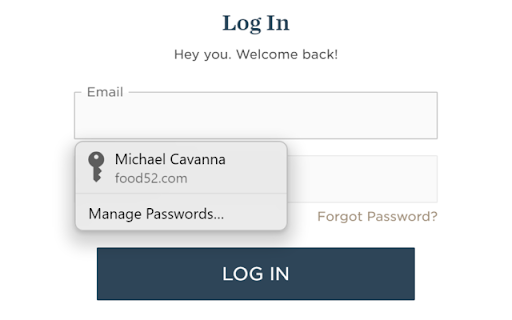
Managing different keys across multiple platforms creates a constant headache when you switch between Windows and Apple devices. iCloud Passwords bridges that gap by letting you securely fill credentials from your keychain when signing in to websites using Chrome. Anyone who relies on Apple hardware while using a Windows PC or macOS Sonoma system faces constant friction trying to keep sign-in details aligned.
Streamlining Your Login Workflow
This browser tool acts as a bridge between your computer and your secure vault. Any new passwords you create in Chrome are saved to your iCloud Keychain so that they are also available across your Apple devices without manual copying. Setting up the system requires the iCloud for Windows app from the Microsoft Store if you use a PC, or macOS Sonoma and later if you use a Mac.
Core Capabilities of iCloud Passwords
- Fill saved credentials automatically when visiting login pages on Chrome.
- Save new passwords directly to your keychain as you create them.
- Generate verification codes by right-clicking on a QR code.
- Synchronize your vault across all your Apple devices seamlessly.
- Operate on Windows via the official iCloud desktop application.
- Function natively on macOS Sonoma or newer operating systems.
How It Compares to Other Password Extensions
Compared to dedicated third-party options like the 1Password extension, this tool focuses entirely on native Apple ecosystem integration. It lacks advanced vault sharing or secure document storage, but it excels at core credential syncing for Apple users who prefer the Chrome browser. You get straightforward password autofill without extra bloat.
Pros and Cons
- Pros: Native synchronization with Apple devices, simple setup process, built-in code generator for two-factor authentication.
- Cons: Requires companion software on Windows, limited feature set compared to standalone vault applications.
Try iCloud Passwords on Chrome Today
The iCloud Passwords Chrome extension is available for free — click the button on the Web Store to add it and start filling passwords from your keychain right away. It also works on other Chromium-based browsers like Microsoft Edge or Brave.
Download iCloud Passwords Chrome extension to manage verification codes directly from the Chrome Web Store.
