Chrome //
Extensions
Chrome //
Extensions  Chrome
Web store
Chrome
Web store background-search Chrome Extension

-
Chrome Extension Page
-
Total Number of Extension users:112 +
-
Reviewed by :3 Chrome Users
-
Author Name:
-
['kyo.ago@gmail.com', 'True', 'kyo_ago']
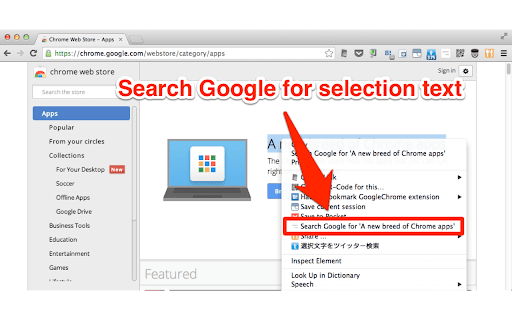
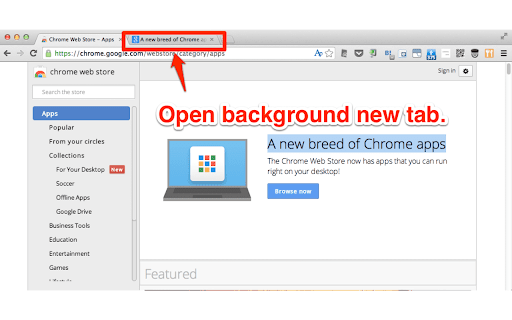
 Search for selected messages in background tabs.

Chromes context menu shifts focus to a new tab.

This extension allows you to keep tabs in the background.

see source.
https://github.com/kyo-ago/background-search

How to install background-search chrome extension in chrome Browser
You can Follow the below Step By Step procedure to install the background-search Chrome Extension to your Chrome Web browser.
- Step 1: Go to the Chrome webstore https://chrome.google.com/webstore or download the extension background-search Chrome Extension Download from https://pluginsaddonsextensions.com
- Step 2: Now search for the background-search in Chrome Webstore Search and click on the search button.
- Step 3: click on the background-search Chrome Extension Link
- Step 4: in the next page click on the Add to Chrome button to Download and Install the background-search extension for your Chrome Web browser .
background-search Chrome extension Download
Looking for a method to background-search Download for Chrome then this download link is for you.It is the background-search Chrome extension download link you can download and install Chrome Browser.
Download background-search chrome extension (CRX)
-
Use bookmarks and bookmarklets from the context menu.
-
A simple way to control the tab order of the browser.
-
Opens the 'Search google for' search in a background tab.
-
Add actual page or any web links on actual page into temporary bookmarks. You can open these web links later.
-
Visual chrome tab manager that respects your context.
-
Add additional search engines to the selection context menu
-
Close tabs using a context menu option.
-
This extension is a incremental search UI for online bookmarks(Google Bookmarks, Pinboard, etc.), You can find bookmarks quickly.
-
Copy the image to the Clipboard in Base64 format. see source https://github.com/kyo-ago/copy-base64
-
This extention helps you manage all open tabs on Chrome