Chrome //
Extensions
Chrome //
Extensions  Chrome
Web store
Chrome
Web store Bookmark Manager Chrome Extension


-
Chrome Extension Page
-
Total Number of Extension users:60K +
-
Reviewed by :53 Chrome Users
-
Author Name:
-
['aureollabs@gmail.com', 'True', 'Aureolls']
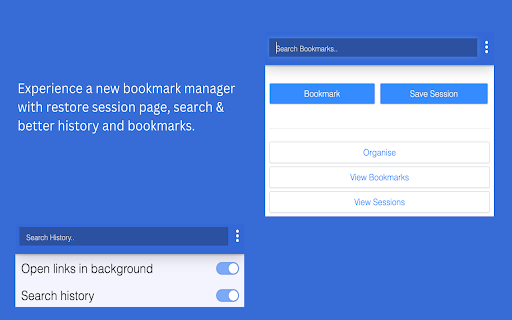
 Experience a new bookmark manager with restore session page, search & better history and bookmarks.

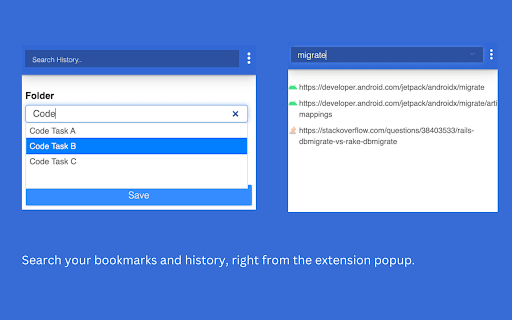
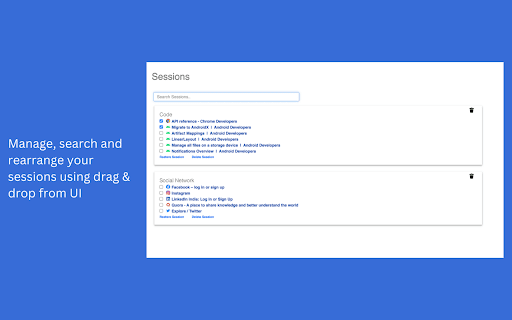
Now rearrange sessions using drag & drop from UI. Sessions page is now with search functionality. You can delete duplicate URLs with one click. You can search your bookmarks and history, right from the extension popup.

Organise your existing bookmarks using Bookmark Manager. You can move your existing bookmarks to separate folders, by just specifying any word present in your bookmark URL.

Manage bookmarks and folders:
- Identify Duplicate bookmarks.
- Clean your bookmarks by deleting empty folders.

Navigate through fields from keyboard using Enter key.

Set shortcut for triggering extension:
Go to Url chrome://extensions/. In the menu there is a Keyboard shortcuts link.

Permissions:
- 'Tabs' in order to bookmark your current session.
- 'Bookmarks' in order to save bookmarks.

Note: None of your information (history or bookmarks) are stored or kept anywhere else than on your computer.


How to install Bookmark Manager chrome extension in chrome Browser
You can Follow the below Step By Step procedure to install the Bookmark Manager Chrome Extension to your Chrome Web browser.
- Step 1: Go to the Chrome webstore https://chrome.google.com/webstore or download the extension Bookmark Manager Chrome Extension Download from https://pluginsaddonsextensions.com
- Step 2: Now search for the Bookmark Manager in Chrome Webstore Search and click on the search button.
- Step 3: click on the Bookmark Manager Chrome Extension Link
- Step 4: in the next page click on the Add to Chrome button to Download and Install the Bookmark Manager extension for your Chrome Web browser .
Bookmark Manager Chrome extension Download
Looking for a method to Bookmark Manager Download for Chrome then this download link is for you.It is the Bookmark Manager Chrome extension download link you can download and install Chrome Browser.
Download Bookmark Manager chrome extension (CRX)
-
Powerful bookmark manager for individuals and teams. Easy to use, secure, and productive.
-
Sort Bookmarks Alphabetically
-
Clean up your bookmark mess! Sort bookmarks automatically, delete duplicates, merge folders, etc.
-
Advanced bookmark manager provides tagging, instant sorting, and filtering among all bookmarks on a full list view.
-
Your bookmarks in one place, organised, always only a click away.
-
A dual-pane Norton Commander liked bookmarks manager that supports sorting, dark theme, search, and duplicate detection
-
Save native bookmarks in Chrome faster.
-
A better look at your browsers Bookmarks with advance searching and the most useful filters
-
Powerfully filter & sort by tags, ratings, visit count, date added, and last visit. And save smart collections for later!
-
Find and remove duplicated bookmarks manually and in batches, get rid of broken bookmark links and empty folders.