Chrome //
Extensions
Chrome //
Extensions  Chrome
Web store
Chrome
Web store Call From Browser Chrome Extension

-
Chrome Extension Page
-
Total Number of Extension users:10K +
-
Reviewed by :113 Chrome Users
-
Author Name:
-
['callfrombrowser@gmail.com', 'True', 'callfrombrowser.com']
 Call From Browser - Make your mobile call numbers you click in your browser!

Tired of manually dialing numbers? Click a phone number in your browser and your mobile will dial it - its that easy!

Installation:
1. Install this Extension
2. Install the Android app from https://play.google.com/store/apps/details?id=com.vzcreations.cfb.app
3. Launch the Android app, log-in with the same Google user you log-in to Chrome and grant the required permissions
Youre all set!

Usage:
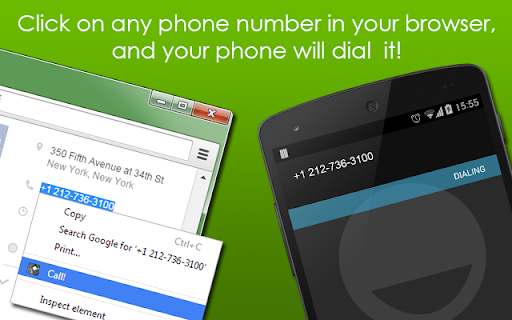
1. Select any phone-number on any webpage, left-click it and press 'Call!'
2. Watch Magic happening :)

Additional Info:
* For now, Call From Mobile supports only Chrome and Android, iPhone and Firefox support is coming soon...
* For Call From Mobile to work, you need to log in to the application using the same user you are logged in in Chrome.
* Please send any comments or suggestions to callfrombrowser@gmail.com
* The permissions this extensions requests are required to allow it to detect phone numbers on the pages.
* Support for tel: links added (enable in the options page)
How to install Call From Browser chrome extension in chrome Browser
You can Follow the below Step By Step procedure to install the Call From Browser Chrome Extension to your Chrome Web browser.
- Step 1: Go to the Chrome webstore https://chrome.google.com/webstore or download the extension Call From Browser Chrome Extension Download from https://pluginsaddonsextensions.com
- Step 2: Now search for the Call From Browser in Chrome Webstore Search and click on the search button.
- Step 3: click on the Call From Browser Chrome Extension Link
- Step 4: in the next page click on the Add to Chrome button to Download and Install the Call From Browser extension for your Chrome Web browser .
Call From Browser Chrome extension Download
Looking for a method to Call From Browser Download for Chrome then this download link is for you.It is the Call From Browser Chrome extension download link you can download and install Chrome Browser.
Download Call From Browser chrome extension (CRX)
-
Click to call phone numbers available on any web page. Make & receive more sales calls, track all calls.
-
Select a phone number, right click and dial it.
-
Place phone calls from any web page
-
This chrome extension use for click to call any number from chrome browser developed by TechExtension (www.techextension.com).
-
-
It is provide click to call from any web page in browser.
-
integration of click2call for all webpages
-
Dial Right From Your Browser
-
This extension converts phone numbers to links which will connect your calls.
-
Detects telephone numbers on any web page, and turns them into clickable links. An account with an Enswitch provider running…