Chrome //
Extensions
Chrome //
Extensions  Chrome
Web store
Chrome
Web store Can I Use? Chrome Extension

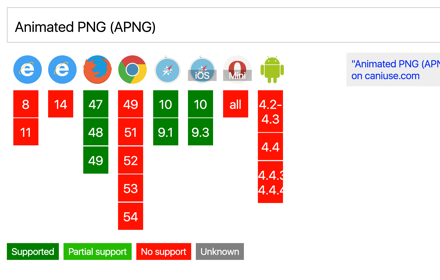
-
Chrome Extension Page
-
Total Number of Extension users:365 +
-
Reviewed by :7 Chrome Users
-
Author Name:
-
['ux@marcelomazza.com.ar', 'True', 'Marcelo Mazza']
 Version 0.6
===========
- Retina icon in manifest
- Cleanup design
- Updated data from caniuse.com

----

caniuse.com unofficial chrome extension.

Souce code on Github:
http://github.com/marcelomazza/caniuse-chrome-extension

@mazzamarcelo

----

Version 0.5
===========
- Changes browser icons (now they are flat)
- Now we only show the most used browsers
- Design tweaks
- Updated feature-list.json

Version 0.4
===========
- Improved L&F details
- Added a link to the original source in caniuse.com (Thanks Neil Carpenter)
- Improved autocomplete usability
- Added visual reference (Thanks Eze de Martiis)

v0.3 / added autocomplete
v0.2 / new icon
v0.1 / initial release

How to install Can I Use? chrome extension in chrome Browser
You can Follow the below Step By Step procedure to install the Can I Use? Chrome Extension to your Chrome Web browser.
- Step 1: Go to the Chrome webstore https://chrome.google.com/webstore or download the extension Can I Use? Chrome Extension Download from https://pluginsaddonsextensions.com
- Step 2: Now search for the Can I Use? in Chrome Webstore Search and click on the search button.
- Step 3: click on the Can I Use? Chrome Extension Link
- Step 4: in the next page click on the Add to Chrome button to Download and Install the Can I Use? extension for your Chrome Web browser .
Can I Use? Chrome extension Download
Looking for a method to Can I Use? Download for Chrome then this download link is for you.It is the Can I Use? Chrome extension download link you can download and install Chrome Browser.
Download Can I Use? chrome extension (CRX)
-
Click the icon in the address bar or press Alt+Shift+V to validate the current page. Results can be seen in Chrome's JS console.
-
jQuery API, jQuery UI, jQuery Mobile API Document Search
-
A quick way to see caniuse.com data
-
LiveStyle — the first bi-directional real-time edit tool for CSS, LESS and SCSS.
-
A handy generator for all of your CSS3 needs from within the browser
-
Fast and easy way to test your responsive design in multiple viewports
-
Search MDN within Chrome omnibox itself
-
Unites Local Storage, Session Storage and Cookie in one place. Powerful functions with intuitive and concise UI.
-
Online CSS3 Code Generator With a Simple Graphical Interface
-
OctoLinker – Links together, what belongs together.