
 Chrome //
Extensions
Chrome //
Extensions  Chrome
Web store
Chrome
Web store cast player Chrome Extension


-
Chrome Extension Page
-
Total Number of Extension users:100K +
-
Reviewed by :399 Chrome Users
-
Author Name:
-
['krakesh14638@gmail.com', 'krakesh14638']
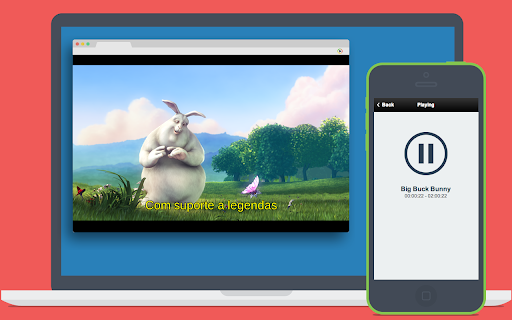
 Now you can play local videos (movies on your desktop) on Chromecast (or Chrome) and control (play, pause, etc)

All you have to do is drop some directory with .MP4 files (supports subdirectories) or drop the .MP4 file into your Chrome browser

ALLOW EXTENSION:
Access chrome://extensions/ and CHECK 'Allow access to file URLs' from 'cast player' extension.

SUBTITLES support! You just need to have an .SRT file with the same name as the movie and in the same directory or choose your subtitles in the video player.
Share us on Facebook (with Facebook post)

Release notes:
0.8.1
fix bug css

0.8.0
fix auto load subtitles
update player
supports picture-in-picture mode (not supports subtitles)


How to install cast player chrome extension in chrome Browser
You can Follow the below Step By Step procedure to install the cast player Chrome Extension to your Chrome Web browser.
- Step 1: Go to the Chrome webstore https://chrome.google.com/webstore or download the extension cast player Chrome Extension Download from https://pluginsaddonsextensions.com
- Step 2: Now search for the cast player in Chrome Webstore Search and click on the search button.
- Step 3: click on the cast player Chrome Extension Link
- Step 4: in the next page click on the Add to Chrome button to Download and Install the cast player extension for your Chrome Web browser .
cast player Chrome extension Download
Looking for a method to cast player Download for Chrome then this download link is for you.It is the cast player Chrome extension download link you can download and install Chrome Browser.
Download cast player chrome extension (CRX)
-
Cast any webpage from your mobile phone to a Chrome browser on your PC. Play/Pause media ont casted webpage like youtube video page.
-
LightCast 2
-
YoukuCast
-
Casts videos in pages like youtube via MkChromecast
-
This extension finds videos on the web sites you are browsing and allows you to play them on your Chromecast device.
-
Mirror or Stream Desktop/Browser to Roku TV.
-
Cast videos and music from more than 50 sites (YouTube, Twitch, Vimeo, SoundCloud, torrent, …) to Kodi.
-
Cast DR TV programs to your Chromecast easily!
-
Allows you to send any internet videos to Chromecast™
-
Share images on a Chromecast


