
 Chrome //
Extensions
Chrome //
Extensions  Chrome
Web store
Chrome
Web store ChitChat - Search with ChatGPT Chrome Extension

-
Chrome Extension Page
-
Total Number of Extension users:2M +
-
Reviewed by :538 Chrome Users
-
Author Name:
-
['xipopolo@gmail.com', 'True', 'GPTsearch']
ChitChat - Search with ChatGPT chrome extension is Display ChatGPT responses with search results. Works on Google, Bing, etc. Supports GPT-4 and Summary feature..
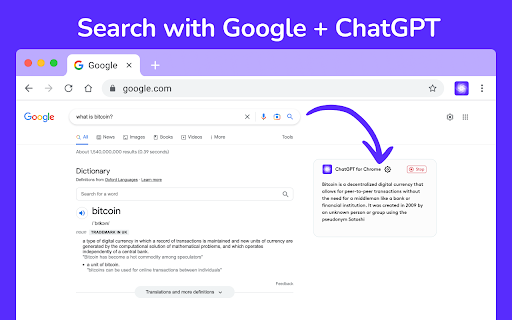


 Discover the novel blend of traditional search results and AI-powered chat responses with ChitChat, a browser extension that supercharges your search engine capabilities. This extension, powered by ChatGPT, works flawlessly with Google, Bing, Yahoo, and DuckDuckGo, presenting AI-generated responses right beside your standard search results.

Interested in launching a conversation with AI immediately after obtaining your answer? ChitChat, backed by the intelligence of ChatGPT, makes it a breeze. Moreover, with ChitChat for Chrome, you can swiftly access the ChatGPT extension through a popup window.

This free tool combines the advanced capabilities of ChatGPT and the convenience of your web browser. Pose any question and receive accurate, succinct answers in real-time, thanks to the power of ChatGPT. Level up your AI experience with this Chrome extension today.

Heres a brief overview of the distinctive features of this extension:

?????? ??????? ??????: With ChitChat, ChatGPT is readily accessible from your browsers extension popup. Theres no need to switch to a separate website or application.

???? ????????????: This feature, using ChatGPTs intelligent understanding, identifies and highlights code snippets within your conversation, enhancing comprehension of code in context.

???? ????: ChitChat includes a dark mode for a more comfortable viewing experience in low-light conditions, reducing eye fatigue.

????????? ???? ???????: Powered by ChatGPT, this extension enables easy copying of text from the chat to your clipboard, particularly useful when transferring information to other apps or documents.

???????: With ChitChat, summarizing webpages or YouTube videos is as easy as right-clicking and selecting summary. This GPT-4 powered feature will provide a time-saving summary for your convenience.

We are certain youll find our ChatGPT-powered extension incredibly beneficial! We eagerly look forward to your reviews and feedback. If you stumble upon any issues or find that something isnt functioning properly, please dont hesitate to get in touch with us.
How to install ChitChat - Search with ChatGPT chrome extension in chrome Browser
You can Follow the below Step By Step procedure to install the ChitChat - Search with ChatGPT Chrome Extension to your Chrome Web browser.
- Step 1: Go to the Chrome webstore https://chrome.google.com/webstore or download the extension ChitChat - Search with ChatGPT Chrome Extension Download from https://pluginsaddonsextensions.com
- Step 2: Now search for the ChitChat - Search with ChatGPT in Chrome Webstore Search and click on the search button.
- Step 3: click on the ChitChat - Search with ChatGPT Chrome Extension Link
- Step 4: in the next page click on the Add to Chrome button to Download and Install the ChitChat - Search with ChatGPT extension for your Chrome Web browser .
ChitChat - Search with ChatGPT Chrome extension Download
Looking for a method to ChitChat - Search with ChatGPT Download for Chrome then this download link is for you.It is the ChitChat - Search with ChatGPT Chrome extension download link you can download and install Chrome Browser.
Download ChitChat - Search with ChatGPT chrome extension (CRX)