Chrome //
Extensions
Chrome //
Extensions  Chrome
Web store
Chrome
Web store Clipboard Manager Chrome Extension


-
Chrome Extension Page
-
Total Number of Extension users:3K +
-
Reviewed by :2 Chrome Users
-
Author Name:
-
['mujo.hydrov@gmail.com', 'Muyor']
 Clipboard Manager is an extension that let you easily store and view clipboard items via toolbar popup.

You can also access up to 7 clipboard items via mouse right click (context-menu). Please note that, the add-on only stores clipboard items when you want to 'paste' them. In other words, when you just copy an item, it is NOT stored to the memory. But, when you paste it to an editable area within a page, it will be stored to the memory. This way, only needed items will be saved to the memory.

In order to access stored clipboard items, please open toolbar popup or right-click on an editable area and then choose clipboard manager in the right-click. Then, click on a desired clipboard item; and it will be inserted to the editable filed.

If you have a feature request, or found a bug to report, please fill the bug report form in the addons homepage (https://mybrowseraddon.com/clipboard-manager.html).
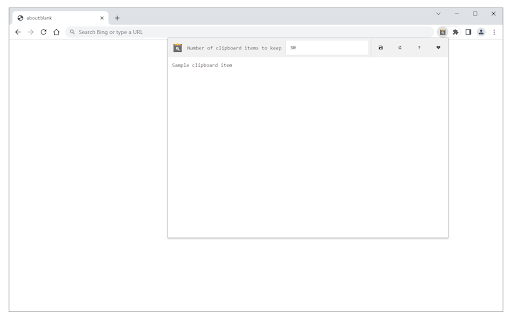
How to install Clipboard Manager chrome extension in chrome Browser
You can Follow the below Step By Step procedure to install the Clipboard Manager Chrome Extension to your Chrome Web browser.
- Step 1: Go to the Chrome webstore https://chrome.google.com/webstore or download the extension Clipboard Manager Chrome Extension Download from https://pluginsaddonsextensions.com
- Step 2: Now search for the Clipboard Manager in Chrome Webstore Search and click on the search button.
- Step 3: click on the Clipboard Manager Chrome Extension Link
- Step 4: in the next page click on the Add to Chrome button to Download and Install the Clipboard Manager extension for your Chrome Web browser .
Clipboard Manager Chrome extension Download
Looking for a method to Clipboard Manager Download for Chrome then this download link is for you.It is the Clipboard Manager Chrome extension download link you can download and install Chrome Browser.
Download Clipboard Manager chrome extension (CRX)
-
Copy to clipboard with just one click.
-
A Cross-platform universal clipboard for myclipboard.io
-
Save infinite copies. Copy & Paste infinitely!
-
Allows you to store and access multiple elements in clipboard
-
This extension allows you to save predefined snippets and paste them to text inputs using context menu.
-
SaveMyClips keeps track of things that you copy in your clipboard so you don't lose them.
-
A superpowered clipboard inside your browser.
-
Easy Clipboard allows you to quickly copy and paste text, urls and more, and store them safely in your browser for future use.
-
Extension to save history of copied text in browser