Chrome //
Extensions
Chrome //
Extensions  Chrome
Web store
Chrome
Web store ColorA11y Chrome Extension


-
Chrome Extension Page
-
Total Number of Extension users:1K +
-
Reviewed by :5 Chrome Users
-
Author Name:
-
['True', 'longmatthewh']
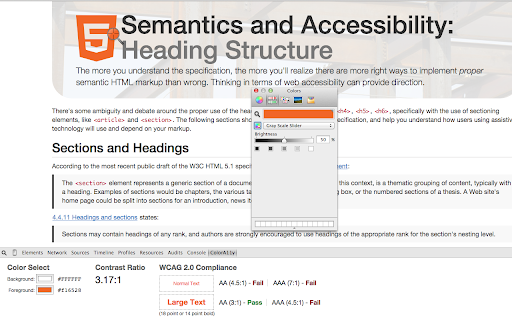
ColorA11y allows you to easily select a foreground color and a background color, and determine whether or not the contrast ratio between the 2 colors is WCAG 2.0 compliant. ColorA11y can help validate the existence of web accessibility issues you think you already have with color contrast. This Developer Tools extension can also help verify youre technically adhering to the WCAG 2.0 color contrast guidelines. Simply open the Developer Tools in Chrome, and open the ColorA11y tab. Currently, this works best using Macs color picker, and not the Windows native tool. Im working on integrating this with Spectrum, and will have an update shortly.


How to install ColorA11y chrome extension in chrome Browser
You can Follow the below Step By Step procedure to install the ColorA11y Chrome Extension to your Chrome Web browser.
- Step 1: Go to the Chrome webstore https://chrome.google.com/webstore or download the extension ColorA11y Chrome Extension Download from https://pluginsaddonsextensions.com
- Step 2: Now search for the ColorA11y in Chrome Webstore Search and click on the search button.
- Step 3: click on the ColorA11y Chrome Extension Link
- Step 4: in the next page click on the Add to Chrome button to Download and Install the ColorA11y extension for your Chrome Web browser .
ColorA11y Chrome extension Download
Looking for a method to ColorA11y Download for Chrome then this download link is for you.It is the ColorA11y Chrome extension download link you can download and install Chrome Browser.
Download ColorA11y chrome extension (CRX)
-
accessibility tool for every website
-
Analyze a web page or portion of a web page for conformance with WCAG 2.0 Color Contrast requirements.
-
Evaluate web accessibility within your browser.
-
Section 508 - Testing Web Content Accessibility
-
Displays ARIA used in web technologies, includes live region, and widget roles, proper nesting and focus management.
-
Accessibility Checker for Developers, Testers, and Designers in Chrome
-
Check the contrast between different colour combinations against WCAG standards
-
Funkify is an extension for Chrome that helps you experience the web and interfaces through the eyes of extreme users with…
-
Accessibility Insights for Web helps developers quickly find and fix accessibility issues.
-
To check the color contrast between foreground and background of the texts