Chrome //
Extensions
Chrome //
Extensions  Chrome
Web store
Chrome
Web store CommPeak - PBX Click2Call Chrome Extension

-
Chrome Extension Page
-
Total Number of Extension users:90 +
-
Reviewed by :1 Chrome Users
-
Author Name:
-
['support@commpeak.com', 'CommPeak']
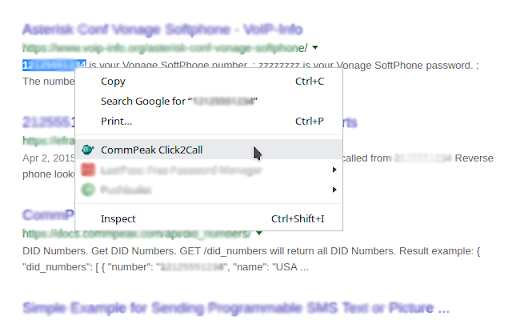
This extension connects your Google Chrome with CommPeaks PBX, allowing you to click-to-call on phone numbers in web pages. You can select any phone number on any page, right click on it and you will see magic 'CommPeak Click2Call' item in context menu which will simply dial to selected number.

How to install CommPeak - PBX Click2Call chrome extension in chrome Browser
You can Follow the below Step By Step procedure to install the CommPeak - PBX Click2Call Chrome Extension to your Chrome Web browser.
- Step 1: Go to the Chrome webstore https://chrome.google.com/webstore or download the extension CommPeak - PBX Click2Call Chrome Extension Download from https://pluginsaddonsextensions.com
- Step 2: Now search for the CommPeak - PBX Click2Call in Chrome Webstore Search and click on the search button.
- Step 3: click on the CommPeak - PBX Click2Call Chrome Extension Link
- Step 4: in the next page click on the Add to Chrome button to Download and Install the CommPeak - PBX Click2Call extension for your Chrome Web browser .
CommPeak - PBX Click2Call Chrome extension Download
Looking for a method to CommPeak - PBX Click2Call Download for Chrome then this download link is for you.It is the CommPeak - PBX Click2Call Chrome extension download link you can download and install Chrome Browser.
Download CommPeak - PBX Click2Call chrome extension (CRX)
-
Click to Call dialing from web pages, integration with any softphone, screen pops in Salesforce and other CRMs
-
Integration supports CRM & Asterisk Server( FreePBX, Elastix, Vici Dial etc).
-
Make phone numbers clickable and initiate calls from Zoiper.
-
It is provide click to call from any web page in browser.
-
This extension converts phone numbers to links which will connect your calls.
-
RingByName Click2Call
-
Turns phone numbers in any web page into click-to-dial links.
-
Simple right click to dial for Chrome context menu
-
FOP2 lets you monitor your Asterisk PBX extension status, launch popups and add click to call capabilites to any web page/app.
-
OnSIP customers can maximize workday efficiency with click-to-call, caller ID popups, and Zendesk & Highrise integration.