Chrome //
Extensions
Chrome //
Extensions  Chrome
Web store
Chrome
Web store CSS Dig Chrome Extension


-
Chrome Extension Page
-
Total Number of Extension users:10K +
-
Reviewed by :51 Chrome Users
-
Author Name:
-
['True', 'tom']
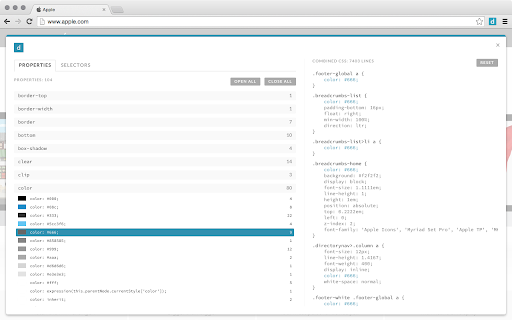
 CSS Dig finds and groups stylesheets and style blocks on most websites, providing an easy way to analyze the code and plan refactors.

Properties: Take a look at all your CSS properties, their frequency and variations. Have too many shades of blue? Inconsistencies often means confusion for your developers and irregularities for your end users.

Selectors & Specificity: Are your selectors long? Using lots of IDs? Specificity wars are frustrating and piling on new CSS will only make the situation worse. Find potential problem areas and make a plan to fix.


How to install CSS Dig chrome extension in chrome Browser
You can Follow the below Step By Step procedure to install the CSS Dig Chrome Extension to your Chrome Web browser.
- Step 1: Go to the Chrome webstore https://chrome.google.com/webstore or download the extension CSS Dig Chrome Extension Download from https://pluginsaddonsextensions.com
- Step 2: Now search for the CSS Dig in Chrome Webstore Search and click on the search button.
- Step 3: click on the CSS Dig Chrome Extension Link
- Step 4: in the next page click on the Add to Chrome button to Download and Install the CSS Dig extension for your Chrome Web browser .
CSS Dig Chrome extension Download
Looking for a method to CSS Dig Download for Chrome then this download link is for you.It is the CSS Dig Chrome extension download link you can download and install Chrome Browser.
Download CSS Dig chrome extension (CRX)
-
Get all css rules used by the selected DOM and its descendants.
-
LiveStyle — the first bi-directional real-time edit tool for CSS, LESS and SCSS.
-
A handy generator for all of your CSS3 needs from within the browser
-
A selection of author settings for Chrome Developer Tools.
-
Given DOM element returns styles applied to it and all its children.
-
A simple CSS property viewer.
-
Analyses any web page for violations of best practices
-
Live preview of CSS/Less/Sass code changes. Auto-save file, autocomplete, Less/Sass to CSS, beautify, CSS reloader, lint, ...
-
Provides Chrome browser integration for the official LiveReload apps (Mac & Windows) and third-parties like guard-livereload and…
-
Extract CSS and build beautiful styleguides.