
 Chrome //
Extensions
Chrome //
Extensions  Chrome
Web store
Chrome
Web store Dizplai Chrome Extension

-
Chrome Extension Page
-
Total Number of Extension users:688 +
-
Reviewed by :8 Chrome Users
-
Author Name:
-
['chrome-extension@dizplai.com', 'Nydalen Oslo 0476 NO', 'True', 'True', 'Dizplai', 'Åse Lill S Jakobsen', 'Dizplai']
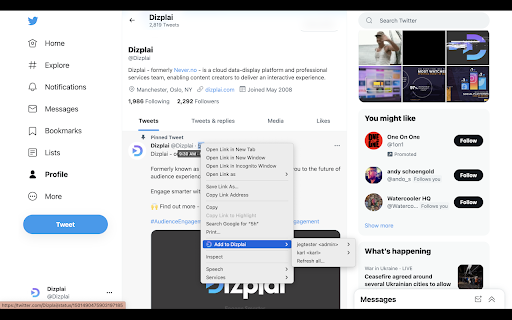
Dizplai chrome extension is Right-click while in a social post, and click Add to Dizplai..

 The Dizplai chrome extension lets you add individual public social posts to existing Searches and Buckets on your Dizplai installation while browsing in Chrome.

How does it work?
* Open a Post that you want to add to your Dizplai environment
* Right-click, and choose 'Add to Dizplai' from the menu
* From the sub-menu select the server and where you want the Post to end up.

For more information, contact your Account Manager!
How to install Dizplai chrome extension in chrome Browser
You can Follow the below Step By Step procedure to install the Dizplai Chrome Extension to your Chrome Web browser.
- Step 1: Go to the Chrome webstore https://chrome.google.com/webstore or download the extension Dizplai Chrome Extension Download from https://pluginsaddonsextensions.com
- Step 2: Now search for the Dizplai in Chrome Webstore Search and click on the search button.
- Step 3: click on the Dizplai Chrome Extension Link
- Step 4: in the next page click on the Add to Chrome button to Download and Install the Dizplai extension for your Chrome Web browser .
Dizplai Chrome extension Download
Looking for a method to Dizplai Download for Chrome then this download link is for you.It is the Dizplai Chrome extension download link you can download and install Chrome Browser.
Download Dizplai chrome extension (CRX)
-
Do more with FB!
-
Extends facebook group's search with couple of filters
-
View highlights on the video player, that are generated from timestamps found in the description and top comments.
-
Quick access to friends' social profiles via the omnibox.
-
This extension opens up the social network pages associated to a specific handle.
-
This extension offers a quick way to show all twitter accounts from the page its on.


