Chrome //
Extensions
Chrome //
Extensions  Chrome
Web store
Chrome
Web store Download to Temp Folder Chrome Extension


-
Chrome Extension Page
-
Total Number of Extension users:667 +
-
Reviewed by :20 Chrome Users
-
Author Name:
-
['Elad Shamir']
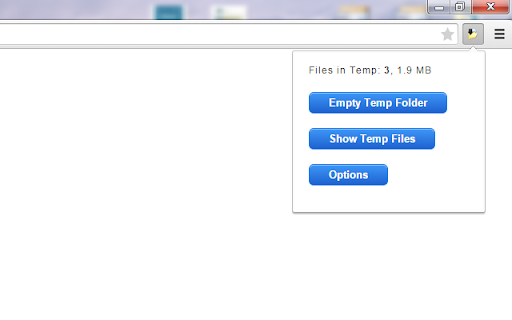
 This extension allows users to download files to a temporary folder, such as DownloadsTemp, rather than the Downloads folder.

Once a download is initiated, a popup appears; press OK to save the download in the Temp folder or Cancel to save the download in the default Downloads folder.

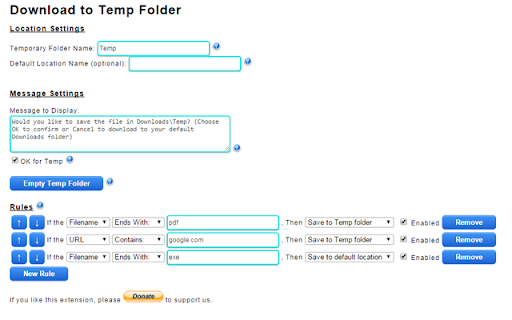
The extension is fully customizable and also supports the application of advanced rules to manage where downloaded files will be saved automatically.


How to install Download to Temp Folder chrome extension in chrome Browser
You can Follow the below Step By Step procedure to install the Download to Temp Folder Chrome Extension to your Chrome Web browser.
- Step 1: Go to the Chrome webstore https://chrome.google.com/webstore or download the extension Download to Temp Folder Chrome Extension Download from https://pluginsaddonsextensions.com
- Step 2: Now search for the Download to Temp Folder in Chrome Webstore Search and click on the search button.
- Step 3: click on the Download to Temp Folder Chrome Extension Link
- Step 4: in the next page click on the Add to Chrome button to Download and Install the Download to Temp Folder extension for your Chrome Web browser .
Download to Temp Folder Chrome extension Download
Looking for a method to Download to Temp Folder Download for Chrome then this download link is for you.It is the Download to Temp Folder Chrome extension download link you can download and install Chrome Browser.
Download Download to Temp Folder chrome extension (CRX)
-
This Extension lets you change download settings, overwrite download files, create sub folder base on file extensions.
-
Automatically organize downloads inside default download location into sub-directories labelled by year and month.
-
Allows you to route your downloads to custom target folders.
-
Organize your downloads automatically! Set custom download locations based on filetype, filename, or source domain.
-
One click to your downloads
-
Quickly open the default 'Downloads' folder. 'key'board shortcut: Alt+J.
-
Hides the download shelf when all downloads complete
-
Lets you quickly find a bookmark folder and save a bookmark inside
-
Saves {image, video, audio, links, selection, page} in directories relative to the default download directory.
-
An extension that sorts the downloaded file to the specified folder