Chrome //
Extensions
Chrome //
Extensions  Chrome
Web store
Chrome
Web store Eagle for Chrome Chrome Extension


-
Chrome Extension Page
-
Total Number of Extension users:300K +
-
Reviewed by :704 Chrome Users
-
Author Name:
-
['augus@ogdesign.tw', 'Augus']
 Browser Extensions allow you to easily save web page images and save screenshots to Eagle.

#1. Drag & Drop:
To collect pictures, just drag & drop it to your Eagle.

#2. Alt + Right-click:
Pressing alt key and right-click on any image to keep it!

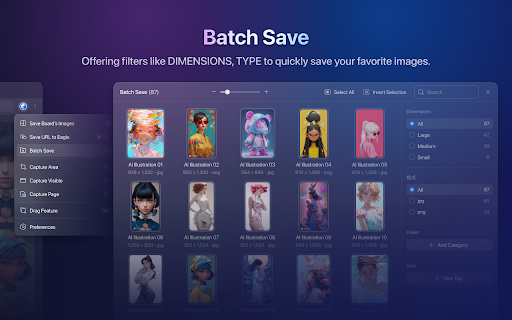
#3. Batch-saving:
Get the pass to easily save images within seconds.

#4. Screen Capture:
The most simple way to take a screenshot of your current browser window.

----------------------------------------------------

Your privacy is very important to us, this extension dont collect any personal information while browsing on the internet.  For more detailed privacy terms, please check: https://en.eagle.cool/privacy




How to install Eagle for Chrome chrome extension in chrome Browser
You can Follow the below Step By Step procedure to install the Eagle for Chrome Chrome Extension to your Chrome Web browser.
- Step 1: Go to the Chrome webstore https://chrome.google.com/webstore or download the extension Eagle for Chrome Chrome Extension Download from https://pluginsaddonsextensions.com
- Step 2: Now search for the Eagle for Chrome in Chrome Webstore Search and click on the search button.
- Step 3: click on the Eagle for Chrome Chrome Extension Link
- Step 4: in the next page click on the Add to Chrome button to Download and Install the Eagle for Chrome extension for your Chrome Web browser .
Eagle for Chrome Chrome extension Download
Looking for a method to Eagle for Chrome Download for Chrome then this download link is for you.It is the Eagle for Chrome Chrome extension download link you can download and install Chrome Browser.
Download Eagle for Chrome chrome extension (CRX)
-
An image extractor for sniffing, analyzing and batch downloading images from web page.
-
这个扩展程序可以让你方便地从任意网站上采集喜欢的图片、视频或者网页截图到花瓣网(huaban.com)上。这是花瓣网官方(huaban.com)提供的扩展。
-
Immersion-reading mode of Chrome extensions, similar to Safari read mode.
-
中文 Figma 插件,设计师人工翻译校验。
-
Web media sniffing tool
-
A bilingual translation extension that delivers a native reading experience at the Click of a button.
-
从界面到功能,全面提升你的 flomo 使用体验
-
Easily find and subscribe to RSS and RSSHub.
-
Native message connector with Quicker application
-
将散落各地的内容集中在一处