Chrome //
Extensions
Chrome //
Extensions  Chrome
Web store
Chrome
Web store Easy MyFitnessPal (ezmfp) Chrome Extension


-
Chrome Extension Page
-
Total Number of Extension users:559 +
-
Reviewed by :5 Chrome Users
-
Author Name:
-
['kevinddavis123@gmail.com', 'True', 'Kevin Davis']
 This extension provides enhancements to MyFitnessPal.com. Please contact me with screenshots and details for any bugs you may encounter at ezmfpdev@gmail.com. Thank you.

Features:
-------------------------------------
Diary page:
-- automatic scrolling that returns you to the meal youre editing
-- button to delete all items per meal
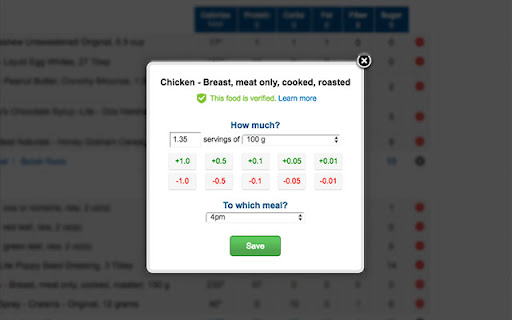
-- buttons to increment/decrement item quantity in quick edit modal

Add to Diary page:
 -- removes pagination to show all pages of recent food items, my foods, meals, and recipes.
 -- fixed navigation on scroll

Release Notes:
-------------------------------------
Version 1.5.0
- remove accurate calorie count
- account for comma separators in quick edit
- code clean up
Version: 1.4.1
-- bugfix with calorie total per meal for premium users
-- added hint about asterisk on diary page
Version: 1.4.0
-- bug fixes with MFP update
-- quicks available from diary page
Version: 1.3.7
-- modified layout of quick edit buttons
Version: 1.3.6
-- performance improvements
Version: 1.3.5
-- added button to delete all items per meal
-- added buttons to increment/decrement item quantity in quick edit modal
Version: 1.3.4
-- refined permissions
Version: 1.3.3
--- Bug fixes
Version: 1.3.2
--- Removed annoying loading graphic
Version: 1.3.1
--- Fixed add to diary tabs that didnt load
--- Fixed issue with add to diary tab pages not loading
--- Added feature for the page to automatically scroll down to the meal youre editing
Version: 1.3.0
 -- Added fixed navigation on Diary page
 -- My Foods, Meals, and Recipes tabs now load all pages.
Version: 1.2.2
 -- Bug fixes, macros should now save correctly when using the absolute mode.
Version: 1.2.1
 -- Bug fix and code enhancements
Version: 1.2.0
 -- Custom goals page: input mode dropdown added to switch between text inputs and dropdowns to choose macros.
Version: 1.1.0
 -- Custom goals page:  macro dropdowns are in increments of one and target grams update automatically.
 -- Name changed again - Easy MyFitnessPal (ezmfp)
Version: 1.0.1
 -- Update the official name to ezmfp - Easy MyFitnessPal
Version: 1.0.0
 -- Initial release.
How to install Easy MyFitnessPal (ezmfp) chrome extension in chrome Browser
You can Follow the below Step By Step procedure to install the Easy MyFitnessPal (ezmfp) Chrome Extension to your Chrome Web browser.
- Step 1: Go to the Chrome webstore https://chrome.google.com/webstore or download the extension Easy MyFitnessPal (ezmfp) Chrome Extension Download from https://pluginsaddonsextensions.com
- Step 2: Now search for the Easy MyFitnessPal (ezmfp) in Chrome Webstore Search and click on the search button.
- Step 3: click on the Easy MyFitnessPal (ezmfp) Chrome Extension Link
- Step 4: in the next page click on the Add to Chrome button to Download and Install the Easy MyFitnessPal (ezmfp) extension for your Chrome Web browser .
Easy MyFitnessPal (ezmfp) Chrome extension Download
Looking for a method to Easy MyFitnessPal (ezmfp) Download for Chrome then this download link is for you.It is the Easy MyFitnessPal (ezmfp) Chrome extension download link you can download and install Chrome Browser.
Download Easy MyFitnessPal (ezmfp) chrome extension (CRX)
-
Lightweight and Beautiful personal diary.
-
This extension replaces the sodium column in FitBit's food logger with net carbs for ketogenic and low carb dieters
-
Adds display of Carb/Protein/Fat -macro- percentages to any daily food diary page on MyFitnessPal.
-
Copy any recipe from any website with just one click. Recipe manager, shopping list, and meal planner. Manage all your recipes in…
-
UI customizations and tweaks for the web version of YNAB.
-
Convert grams and calories