Chrome //
Extensions
Chrome //
Extensions  Chrome
Web store
Chrome
Web store EVS7 Click to Call Chrome Extension


-
Chrome Extension Page
-
Total Number of Extension users:438 +
-
Reviewed by :5 Chrome Users
-
Author Name:
-
['sales@evs7.com', '13601 Preston Road Suite E720 Dallas, TX 75240 US', 'EVS7', 'Electronic Voice Services, Inc.']
Works with Zoho, Salesforce, Sugar and most other web based CRMs. For more info visit our website below.

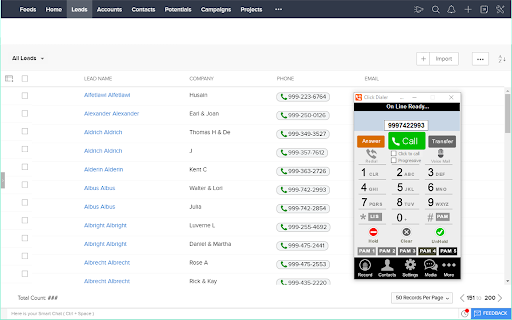

How to install EVS7 Click to Call chrome extension in chrome Browser
You can Follow the below Step By Step procedure to install the EVS7 Click to Call Chrome Extension to your Chrome Web browser.
- Step 1: Go to the Chrome webstore https://chrome.google.com/webstore or download the extension EVS7 Click to Call Chrome Extension Download from https://pluginsaddonsextensions.com
- Step 2: Now search for the EVS7 Click to Call in Chrome Webstore Search and click on the search button.
- Step 3: click on the EVS7 Click to Call Chrome Extension Link
- Step 4: in the next page click on the Add to Chrome button to Download and Install the EVS7 Click to Call extension for your Chrome Web browser .
EVS7 Click to Call Chrome extension Download
Looking for a method to EVS7 Click to Call Download for Chrome then this download link is for you.It is the EVS7 Click to Call Chrome extension download link you can download and install Chrome Browser.
Download EVS7 Click to Call chrome extension (CRX)
-
Click-to-Call Directly from Your Helpdesk, CRM, Sales Software and Any Website.
-
Click to call phone numbers available on any web page. Make & receive more sales calls, track all calls.
-
Kixie PowerCall enhances your Kixie experience by enabling click-to-call, immediate CRM data access and simple activity scheduling.
-
This chrome extension use for click to call any number from chrome browser developed by TechExtension (www.techextension.com).
-
Click to Call dialing from web pages, integration with any softphone, screen pops in Salesforce and other CRMs
-
-
CrazyCall automatically highlights phone numbers on websites and allows you to call them with just a click!
-
It is provide click to call from any web page in browser.
-
Call any phone number straight from where you are on a web page.
-
Quick launch the Dialpad app and link phone numbers to call via Dialpad