Chrome //
Extensions
Chrome //
Extensions  Chrome
Web store
Chrome
Web store Five9 Adapter for NetSuite Chrome Extension


-
Chrome Extension Page
-
Total Number of Extension users:725 +
-
Reviewed by :0 Chrome Users
-
Author Name:
-
['cases@five9.com', '3001 Bishop Dr Ste. 350 San Ramon, CA 94583 US', 'True', 'Five9, Inc.', 'Five9, Inc']
 Five9, a provider of cloud contact center software, brings the power of the cloud to thousands of customers worldwide and facilitates more than three billion customer interactions annually. Since 2001, Five9 has helped organizations of every size transition from premise-based software to the cloud. The purpose-built, highly scalable and secure Five9 Virtual Contact Center cloud platform delivers a comprehensive suite of easy-to-use applications that enable the breadth of contact center-related customer service, sales and marketing functions.

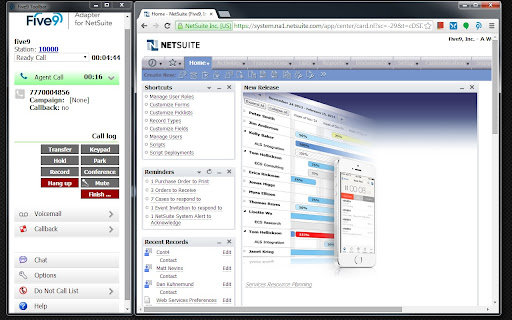
Get the most out of NetSuite and contact center solution. Leverage Five9 market-leading expertise in CRM integrations and give your agents the management tools they need to make customers happy.

For more information, visit www.five9.com.
How to install Five9 Adapter for NetSuite chrome extension in chrome Browser
You can Follow the below Step By Step procedure to install the Five9 Adapter for NetSuite Chrome Extension to your Chrome Web browser.
- Step 1: Go to the Chrome webstore https://chrome.google.com/webstore or download the extension Five9 Adapter for NetSuite Chrome Extension Download from https://pluginsaddonsextensions.com
- Step 2: Now search for the Five9 Adapter for NetSuite in Chrome Webstore Search and click on the search button.
- Step 3: click on the Five9 Adapter for NetSuite Chrome Extension Link
- Step 4: in the next page click on the Add to Chrome button to Download and Install the Five9 Adapter for NetSuite extension for your Chrome Web browser .
Five9 Adapter for NetSuite Chrome extension Download
Looking for a method to Five9 Adapter for NetSuite Download for Chrome then this download link is for you.It is the Five9 Adapter for NetSuite Chrome extension download link you can download and install Chrome Browser.
Download Five9 Adapter for NetSuite chrome extension (CRX)
-
Examine the fields in a Netsuite record
-
This extension helps to speed up the normal use of the NetSuite platform, through the use of SuiteScript 1.0.
-
Five9 Agent Desktop Toolkit.
-
Extends the NetSuite Field Help and adds relevant information to improve your productivity.
-
Export your saved searches to Suitescript.
-
Have Better Customer Conversations
-
Add HTML elements and styles to your script notes. View Pretty Print JSON objects. Links to records.
-
Provides a phone, records screen activity, shows alerts when the browser is minimized. Requires Agent Desktop Helper Application.
-
Provides an integration between Five9 and Velocify applications.
-
Hover over NetSuite fields to show their IDs. Find fields by their ID or Label.