Chrome //
Extensions
Chrome //
Extensions  Chrome
Web store
Chrome
Web store h264ify Chrome Extension

-
Chrome Extension Page
-
Total Number of Extension users:1M +
-
Reviewed by :1118 Chrome Users
-
Author Name:
-
['True', 'erkserkserks']
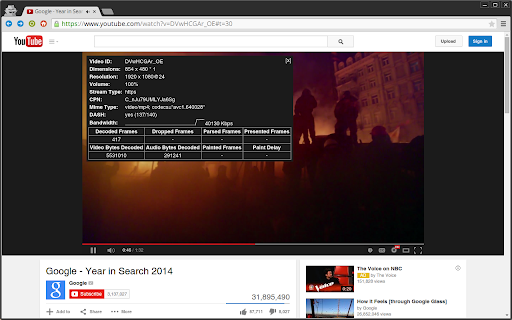
 Try h264ify if YouTube videos stutter, take up too much CPU, eat battery life, or make your laptop hot.

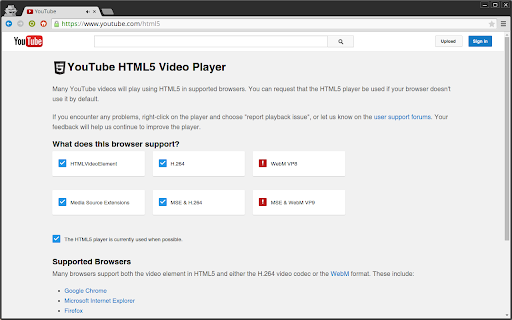
By default, YouTube streams VP8/VP9 encoded video. However, this can cause problems with less powerful machines because VP8/VP9 is not typically hardware accelerated.

In contrast, H.264 is commonly hardware accelerated by GPUs, which usually means smoother video playback and reduced CPU usage. h264ify makes YouTube stream H.264 videos instead of VP8/VP9 videos.

Github: https://github.com/erkserkserks/h264ify
How to install h264ify chrome extension in chrome Browser
You can Follow the below Step By Step procedure to install the h264ify Chrome Extension to your Chrome Web browser.
- Step 1: Go to the Chrome webstore https://chrome.google.com/webstore or download the extension h264ify Chrome Extension Download from https://pluginsaddonsextensions.com
- Step 2: Now search for the h264ify in Chrome Webstore Search and click on the search button.
- Step 3: click on the h264ify Chrome Extension Link
- Step 4: in the next page click on the Add to Chrome button to Download and Install the h264ify extension for your Chrome Web browser .
h264ify Chrome extension Download
Looking for a method to h264ify Download for Chrome then this download link is for you.It is the h264ify Chrome extension download link you can download and install Chrome Browser.
Download h264ify chrome extension (CRX)
-
Enhance your YouTube watching experience! Cinema Mode, Mouse Wheel Volume Control, AutoHD, Expand, Snapshots …
-
Make your web pages load faster! Boost browser speed!
-
YouTube, tidy + smart? Youtube video youtube player size youtube color ad skip speed volume channel skipper tags playlist hide
-
Extremely lightweight Chrome plugin to disable AV1 on YouTube and other sites.
-
Fix position:fixed by adding transform:translateZ(0) to element. For smooth scrolling with 60fps.
-
Automatically set the video quality on YouTube according to its FPS!
-
Automatically set your default YouTube™ video quality with this great new Auto HD, supporting high definition resolution HD/4k/8k.
-
Sends videos in pages like youtube to an external MPV player
-
Browse the web faster.
-
Easily play flash content across the web!