Chrome //
Extensions
Chrome //
Extensions  Chrome
Web store
Chrome
Web store In-Page Piano Analytics Chrome Extension

-
Chrome Extension Page
-
Total Number of Extension users:2K +
-
Reviewed by :5 Chrome Users
-
Author Name:
-
['support@atinternet.com', 'True', 'at-internet-chromedev']
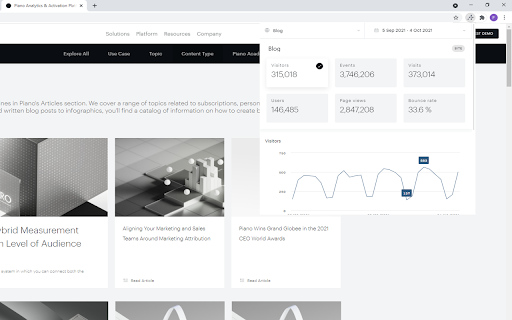
 The In-Page Piano Analytics extension allows you to analyse your website’s traffic directly within the browsers active page.

You can use the popup view or the Chrome DevTools view (F12) in order to keep the display during navigation.

You need a valid Piano Analytics account to use it.


How to install In-Page Piano Analytics chrome extension in chrome Browser
You can Follow the below Step By Step procedure to install the In-Page Piano Analytics Chrome Extension to your Chrome Web browser.
- Step 1: Go to the Chrome webstore https://chrome.google.com/webstore or download the extension In-Page Piano Analytics Chrome Extension Download from https://pluginsaddonsextensions.com
- Step 2: Now search for the In-Page Piano Analytics in Chrome Webstore Search and click on the search button.
- Step 3: click on the In-Page Piano Analytics Chrome Extension Link
- Step 4: in the next page click on the Add to Chrome button to Download and Install the In-Page Piano Analytics extension for your Chrome Web browser .
In-Page Piano Analytics Chrome extension Download
Looking for a method to In-Page Piano Analytics Download for Chrome then this download link is for you.It is the In-Page Piano Analytics Chrome extension download link you can download and install Chrome Browser.
Download In-Page Piano Analytics chrome extension (CRX)
-
The latest AB Tasty extension for Google Chrome.
-
Omnibug is a browser extension to decode and display outgoing digital marketing tool requests.
-
Troubleshoot and audit analytics tags, variables and on-click events. Supports Adobe Analytics, Google Analytics, Ensighten and more
-
Tag Inspector Analytics Tool
-
The easiest way to debug and check the dataLayer implementations without having to use the browser console!
-
Categorize, record and display AT Internet tags, with parameters meaning. Access their DataQuery and show CTA activity charts.
-
Debug and test tag management (Google Tag Manager, DTM, Tealium) and analytics implementations.
-
Your Single Source of Truth (SSOT) for debugging analytics implementations
-
An easy way to see how often a link has been shared, who shared it and what they said!
-
Commanders Act Assistant helps to troubleshoot TagCommander implementation and more