Chrome //
Extensions
Chrome //
Extensions  Chrome
Web store
Chrome
Web store Later - Save Images for Instagram Chrome Extension

-
Chrome Extension Page
-
Total Number of Extension users:10K +
-
Reviewed by :59 Chrome Users
-
Author Name:
-
['cto@later.com', '88 E Pender st Vancouver, BC V6A 1T1 CA', 'True', 'True', 'later-developers', 'Later.com', 'Later.com']
 Save post-worthy photos to your Later media library—from anywhere on the web.

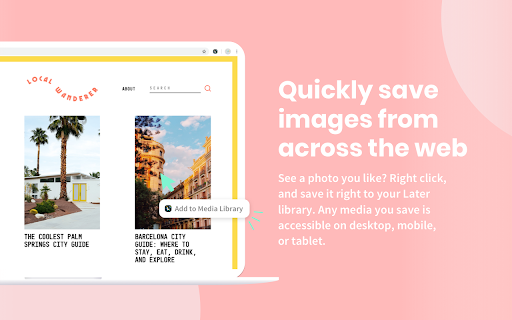
The Later Chrome extension helps you share the perfect social media content even faster. Just right click on any image and save directly to your Later media library. We import the page title and original url —so you’ll never forget who to credit.

Any media you save is accessible on desktop, mobile, or tablet.

Using Adobe Spark? This extension is for you. Once you’ve created your image, hit “share” and choose Later as a source. Your file, along with any notes, will be added directly to your media library.

Haven’t got a Later account yet? Sign up for free at Later.com.



How to install Later - Save Images for Instagram chrome extension in chrome Browser
You can Follow the below Step By Step procedure to install the Later - Save Images for Instagram Chrome Extension to your Chrome Web browser.
- Step 1: Go to the Chrome webstore https://chrome.google.com/webstore or download the extension Later - Save Images for Instagram Chrome Extension Download from https://pluginsaddonsextensions.com
- Step 2: Now search for the Later - Save Images for Instagram in Chrome Webstore Search and click on the search button.
- Step 3: click on the Later - Save Images for Instagram Chrome Extension Link
- Step 4: in the next page click on the Add to Chrome button to Download and Install the Later - Save Images for Instagram extension for your Chrome Web browser .
Later - Save Images for Instagram Chrome extension Download
Looking for a method to Later - Save Images for Instagram Download for Chrome then this download link is for you.It is the Later - Save Images for Instagram Chrome extension download link you can download and install Chrome Browser.
Download Later - Save Images for Instagram chrome extension (CRX)
-
The easiest way to download photos and videos from Instagram.com
-
Download any photo and video from the instagram to your computer in one click!
-
Post like champions and increase your social media reach by 75%, by smartly repeating your posts.
-
Extension with quick links to selected websites.
-
Easily generate copy with AI, schedule and publish to Pinterest and Instagram.
-
Take your daily inspiration from our photo calendar, based on 365 images
-
Download images/videos from instagram. No ads. Enjoy :)
-
Create Instagram repost with automatic captions for scheduling with Later.com extension.
-
Save images and videos from Instagram.
-
This extension allows saving of any Instagram or Flickr image via a single click on the context menu.