Chrome //
Extensions
Chrome //
Extensions  Chrome
Web store
Chrome
Web store Layout Debugger Chrome Extension


-
Chrome Extension Page
-
Total Number of Extension users:870 +
-
Reviewed by :3 Chrome Users
-
Author Name:
-
['cdsnowden@gmail.com', 'True', 'cdsnowden']
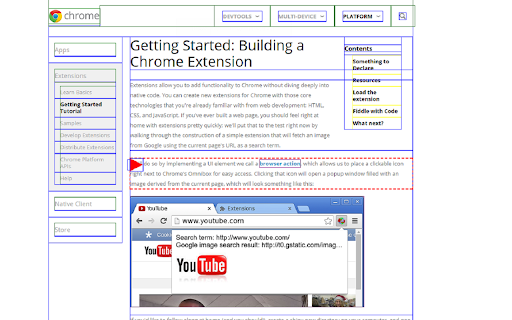
 - Identifying too-wide overflowing objects.
- Distinguishing block from inline elements.
- Helping to keep track of element alignment.

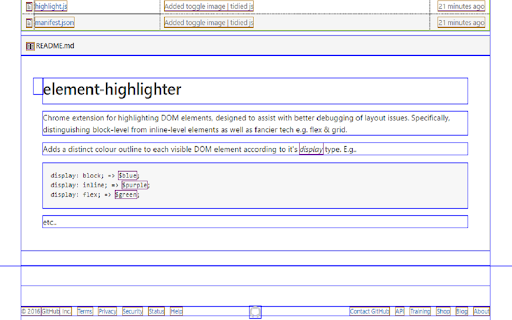
Adds a distinct colour outline to each visible DOM element, as well as providing a visual prompt for overflowing divs.

display: block; => blue;
display: inline; => purple;
overflowing the viewport => red!
etc..
How to install Layout Debugger chrome extension in chrome Browser
You can Follow the below Step By Step procedure to install the Layout Debugger Chrome Extension to your Chrome Web browser.
- Step 1: Go to the Chrome webstore https://chrome.google.com/webstore or download the extension Layout Debugger Chrome Extension Download from https://pluginsaddonsextensions.com
- Step 2: Now search for the Layout Debugger in Chrome Webstore Search and click on the search button.
- Step 3: click on the Layout Debugger Chrome Extension Link
- Step 4: in the next page click on the Add to Chrome button to Download and Install the Layout Debugger extension for your Chrome Web browser .
Layout Debugger Chrome extension Download
Looking for a method to Layout Debugger Download for Chrome then this download link is for you.It is the Layout Debugger Chrome extension download link you can download and install Chrome Browser.
Download Layout Debugger chrome extension (CRX)
-
This extension shows the density of elements on your page
-
This extension is a tool that helps visualize the layout of HTML elements on a webpage
-
Toggle classes and attributes
-
A totally awesome structure and layout debugger that inserts CSS outlines to all elements.
-
HTML Visual Validation gives you information about the html elements, live, on page.
-
This extension outlines all the DOM elements on a page
-
Adds outline to all elements on the page to show the culprit element which is changing desired layout
-
Debug your layouts with one line of CSS and a single click.
-
Add borders or shaders to your webpage on the fly. No need to write debug markup to fix layout components.