
 Chrome //
Extensions
Chrome //
Extensions  Chrome
Web store
Chrome
Web store Lnnkin - Safe Url Shortener Chrome Extension

-
Chrome Extension Page
-
Total Number of Extension users:1K +
-
Reviewed by :8 Chrome Users
-
Author Name:
-
['support@lnnkin.com', 'True', 'Lnnkin']
Lnnkin - Safe Url Shortener chrome extension is Lnnkin is a free URL shortener that provides companies with short, unique, secure & customizable links which can be monitored..
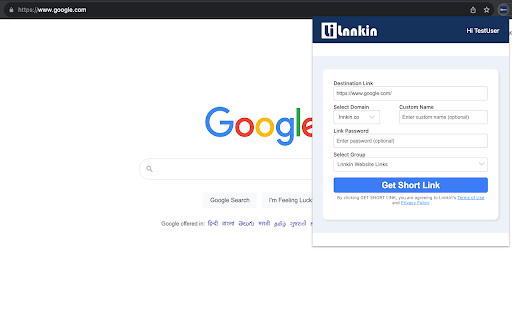

 Lnnkin key features:

* Unlimited short links - Create unlimited short links using our website or browser extensions for free with lifetime validity.

* Unlimited custom links - Create unlimited custom links using our website or browser extensions.

* Branded links - Create branded short links with your own domains. Improve link CTR with branded short links.

* Password protected short links - Restrict access to your sensitive data by creating password protected short or custom links.

* Edit short links - Fix broken links by changing the destination URL of short links & redirect all traffic to correct location.

* Delete short links - Delete unwanted or unused short links any time. Short links can also be temporarily disabled or enabled.

* Grouping links - Efficiently manage short links by grouping them in different groups based on their category, campaign, project etc.

* Track short link clicks - See real time click insights for free. Filter clicks data by device, country, referrer, browser & operating system etc.

* Multiple users - Add users to your account and collaborate with your teammates.
How to install Lnnkin - Safe Url Shortener chrome extension in chrome Browser
You can Follow the below Step By Step procedure to install the Lnnkin - Safe Url Shortener Chrome Extension to your Chrome Web browser.
- Step 1: Go to the Chrome webstore https://chrome.google.com/webstore or download the extension Lnnkin - Safe Url Shortener Chrome Extension Download from https://pluginsaddonsextensions.com
- Step 2: Now search for the Lnnkin - Safe Url Shortener in Chrome Webstore Search and click on the search button.
- Step 3: click on the Lnnkin - Safe Url Shortener Chrome Extension Link
- Step 4: in the next page click on the Add to Chrome button to Download and Install the Lnnkin - Safe Url Shortener extension for your Chrome Web browser .
Lnnkin - Safe Url Shortener Chrome extension Download
Looking for a method to Lnnkin - Safe Url Shortener Download for Chrome then this download link is for you.It is the Lnnkin - Safe Url Shortener Chrome extension download link you can download and install Chrome Browser.
Download Lnnkin - Safe Url Shortener chrome extension (CRX)
-
Create a free short analytics URL with one click of Goo.su. Install the link reduction plugin in your browser
-
Create and share short links using tinyurl, bit.ly, cutt.ly, is.gd, v.gd, tny.im and also generate QR code for shortened Url
-
Fast and simple shorten of current tab urls with direct sharing options.


