Chrome //
Extensions
Chrome //
Extensions  Chrome
Web store
Chrome
Web store Markdown Here Chrome Extension


-
Chrome Extension Page
-
Total Number of Extension users:100K +
-
Reviewed by :359 Chrome Users
-
Author Name:
-
['pritchard.adam@gmail.com', 'True', 'Adam Pritchard']
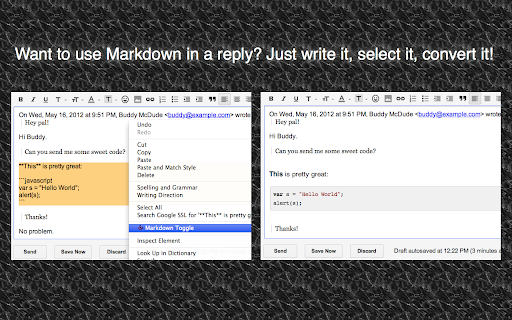
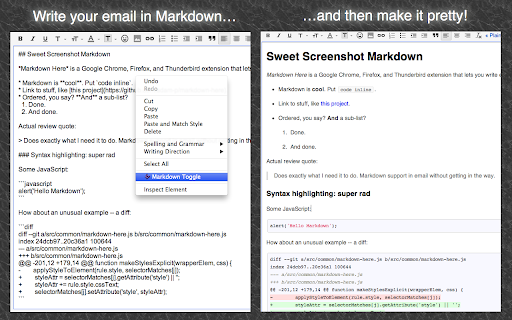
 Markdown Here lets you write email in Markdown and render it (make it pretty!) before sending.

This is great for anyone who doesnt like fiddling around with formatting buttons while writing an email. Its especially good for programmers who write email with code in them -- it even supports syntax highlighting. And for the mathematicians among us: Markdown Here will render TeX formulae as well.

Totally simple to use:
1. Write your email in your email clients rich editor using Github-flavoured Markdown.
2. Right-click in the compose area and then click 'Markdown Toggle'.
3. Your email is now pretty! (That is, its been rendered to HTML.)
4. If you like the way it looks, just send it. If you want to change or add something, click 'Markdown Toggle' again to get back to your original Markdown.
5. Repeat as necessary.

Markdown Here is primarily targeted to work with Gmail and Thunderbird, but it also works pretty well with Yahoo and Hotmail. Additionally, it works great with Google Groups and Sites, Evernotes web interface, Blogger, Wordpress, and more!

Syntax highlighting note: Use fenced code blocks and specify the language name. See the project page for an example.

Privacy: Markdown Here accesses and modifies web content when you activate it. It can, in theory, access other web content, but does not. It also makes no Internet requests whatsoever. Your data is modified when and where you choose, and does not leave your browser.

Available as a Chrome, Firefox, Safari, Opera, and Thunderbird extension.

This is an open source project. Visit Markdown Heres Github page for full instructions, more information, bug reports, or to contribute.

http://markdown-here.com
https://github.com/adam-p/markdown-here

How to install Markdown Here chrome extension in chrome Browser
You can Follow the below Step By Step procedure to install the Markdown Here Chrome Extension to your Chrome Web browser.
- Step 1: Go to the Chrome webstore https://chrome.google.com/webstore or download the extension Markdown Here Chrome Extension Download from https://pluginsaddonsextensions.com
- Step 2: Now search for the Markdown Here in Chrome Webstore Search and click on the search button.
- Step 3: click on the Markdown Here Chrome Extension Link
- Step 4: in the next page click on the Add to Chrome button to Download and Install the Markdown Here extension for your Chrome Web browser .
Markdown Here Chrome extension Download
Looking for a method to Markdown Here Download for Chrome then this download link is for you.It is the Markdown Here Chrome extension download link you can download and install Chrome Browser.
Download Markdown Here chrome extension (CRX)
-
GitHub on steroids
-
Markdown Viewer
-
The Hacker's Browser. Vimium provides 'key'board shortcuts for navigation and control in the spirit of Vim.
-
Adds code intelligence to GitHub, GitLab, and other hosts: hovers, definitions, references. For 20+ languages.
-
A Github Flavored Markdown Editor
-
Converts and previews markdown files (.md, .markdown) to HTML(include TOC) right inside Chrome and support live reload
-
Immersion-reading mode of Chrome extensions, similar to Safari read mode.
-
WizClipper
-
一键保存精彩网页,多终端同步,永久珍藏
-
当你打开本插件时,你将会看到一个长长的chrome 扩展列表,这是你chrome浏览器安装的所有扩展。你可以通过鼠标点击来启用或者禁用选中的chrome 扩展