Chrome //
Extensions
Chrome //
Extensions  Chrome
Web store
Chrome
Web store minerBlock Chrome Extension


-
Chrome Extension Page
-
Total Number of Extension users:100K +
-
Reviewed by :301 Chrome Users
-
Author Name:
-
['cryptominedev@gmail.com', 'CryptoMineDev']
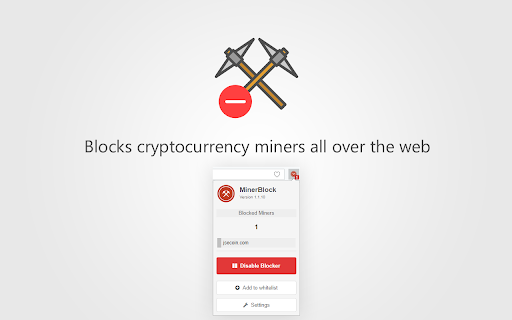
 MinerBlock is an efficient browser extension that aims to block browser-based cryptocurrency miners all over the web.

The extension uses two different approaches to block miners. The first one is based on blocking requests/scripts loaded from a blacklist, this is the traditional approach adopted by most ad-blockers and other mining blockers.

The other approach which makes MinerBlock more efficient against cryptojacking is detecting potential mining behavior inside loaded scripts and kills them immediately.

This makes the extension able to block inline scripts as well as miners running through proxies.

Source code available on Github :
https://github.com/xd4rker/MinerBlock

▬▬▬▬▬   CHANGELOG   ▬▬▬▬▬

Version 1.2.18 (16/10/2022):

- Added new Coinhive clone signature.

Version 1.2.17 (31/01/2021):

- Updated filters list

Version 1.2.16 (03/02/2019):

- Updated filters list

Version 1.2.16 (03/02/2019):

- Updated filters list

Version 1.2.15 (20/11/2018):

- Updated filters list

Version 1.2.14 (09/11/2018):

- Updated filters list
- Few bugfixes

Version 1.2.13 (21/10/2018):

- Updated filters list

Version 1.2.12 (11/10/2018):

- Updated filters list

Version 1.2.11 (16/09/2018):

- Updated filters list

Version 1.2.10 (25/08/2018):

- Updated filters list

Version 1.2.9 (19/08/2018):

- Updated filters list

Version 1.2.8 (15/07/2018):

- Bugfix for Cloudflares Rocket Loader
- Bugfix for minerkill.js giving false positives
- Updated filters list

Version 1.2.7 (10/07/2018):

- Updated filters list

Version 1.2.6 (02/06/2018):

- Updated filters list

Version 1.2.5 (17/05/2018):

- Updated filters list
- Added Kitty/Me0w miner signature

Version 1.2.4 (07/05/2018):

- Updated filters list
- Bugfix for whitelist check issue

Version 1.2.3 (26/04/2018):

- Updated filters list

Version 1.2.2 (13/04/2018):

- Updated filters list
- Tiny bugfix

Version 1.2.1 (02/04/2018):

- Updated filters list
- Tiny bugfix

Version 1.2.0 (26/03/2018):

- Added support for comments in filters list
- Updated filters list

Version 1.1.18 (17/03/2018):

- Tiny improvements
- Updated filters list

Version 1.1.17 (12/03/2018):

- Tiny improvements
- Updated filters list

Version 1.1.16 (07/03/2018):

- Updated filters list

Version 1.1.15 (01/03/2018):

- Updated filters list

Version 1.1.14 (25/02/2018):

- Updated filters list

Version 1.1.13 (18/02/2018):

- Updated filters list
- Minor UI improvements

Version 1.1.12 (14/02/2018):

- Updated filters list

Version 1.1.11 (10/02/2018):

- Updated filters list
- Bugfixes

Version 1.1.10 (07/02/2018):

- Updated filters list
- Tiny UI improvements

Version 1.1.9 (05/02/2018):

- Updated filters list

Version 1.1.7 (04/02/2018):

- Updated filters list
- Bugfixes

Version 1.1.6 (30/01/2018):

- Updated filters list

Version 1.1.5 (27/01/2018):

- Updated filters list

Version 1.1.4 (19/01/2018):

- Updated filters list

Version 1.1.3 (13/01/2018):

- Updated filters list

Version 1.1.2 (01/01/2018):

- Added XSS protection
- Fixed unclosed HTML tags on options page
- Updated filters list

Version 1.1.1 (22/12/2017):

- Updated filters list

Version 1.1 (18/12/2017):

- Updated filters list

Version 1.0 (10/12/2017):

- Added feature to show blocked requests
- Bugfix for ipv4 addresses whitelisting
- Updated filters list

Version 0.4.95 (08/12/2017):

- Updated filters list

Version 0.4.94 (07/12/2017):

- Updated filters list

Version 0.4.93 (07/12/2017):

- Updated filters list

Version 0.4.92 (02/12/2017):

- Updated filters list

Version 0.4.91 (12/11/2017):

- Bug Fix
- Updated filters list

Version 0.4.9 (04/11/2017):

- Bug fix
- Updated filters list

Version 0.4.8 (20/10/2017):

- Bug fix
- Updated filters list

Version 0.4.7 (18/10/2017):

- Updated filters list

Version 0.4.6 (17/10/2017):

- Updated filters list

Version 0.4.5 (10/10/2017):

- Added crypto-loot filter

Version 0.4.4 (07/10/2017):

- Added feature to block inline scripts (coinhive)

Version 0.4.3 (03/10/2017):

- Added a temporary filter to the list

Version 0.4.2 (30/09/2017):

- Added a new filter to the list

Version 0.4.1 (28/09/2017):

- Added new filters to the list

Version 0.4.0 (26/09/2017):

- Added settings page
- Added white list feature
- Added user defined filters
- Bug fixes

Version 0.3 (23/09/2017):

- Added new filters to the list

How to install minerBlock chrome extension in chrome Browser
You can Follow the below Step By Step procedure to install the minerBlock Chrome Extension to your Chrome Web browser.
- Step 1: Go to the Chrome webstore https://chrome.google.com/webstore or download the extension minerBlock Chrome Extension Download from https://pluginsaddonsextensions.com
- Step 2: Now search for the minerBlock in Chrome Webstore Search and click on the search button.
- Step 3: click on the minerBlock Chrome Extension Link
- Step 4: in the next page click on the Add to Chrome button to Download and Install the minerBlock extension for your Chrome Web browser .
minerBlock Chrome extension Download
Looking for a method to minerBlock Download for Chrome then this download link is for you.It is the minerBlock Chrome extension download link you can download and install Chrome Browser.
Download minerBlock chrome extension (CRX)
-
Multicurrency faucet rotator which increase your profit, simplify and accelerate satoshi collection.
-
block Bitcoin Mining in your browser!
-
Maximum protection for your browser: NoScript allows active content only for trusted domains of your choice to prevent exploitation.
-
CryptoMining Blocker extension for Chrome blocks cryptomining websites, inline mining script and helps to do safe-browsing.
-
Adds various options to enhance the user experience.
-
Easily stop coin miners from using your computer resources.
-
Re-implements the Google Images' 'View Image' button.
-
Remove tracking elements from URLs.
-
Protects you against tracking through 'free', centralized, content delivery.
-
Point & click to forbid/allow any class of requests made by your browser. Use it to block scripts, iframes, ads, facebook, etc.