Chrome //
Extensions
Chrome //
Extensions  Chrome
Web store
Chrome
Web store Multitab I/O Chrome Extension

-
Chrome Extension Page
-
Total Number of Extension users:330 +
-
Reviewed by :3 Chrome Users
-
Author Name:
-
['dr.zaus']
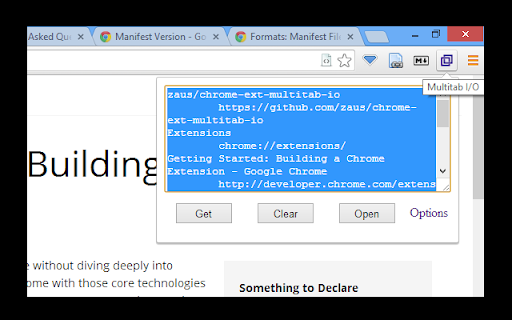
 Simplified import/export of your current browsing session: it creates a list of the open tabs from the active window, allowing you to share this list however you choose (e.g. via email or basic text file).  You can also paste that list of urls to open them all in new tabs.

Specifics on usage:
1. It checks for links, one per line
2. Links must be the only thing on the line
3. Links are identified by starting with http or containing ://
4. Anything not matching link criteria is ignored (i.e. title lines)

Permissions:
1. Tabs and Browsing Activity -- required to get the list of open tabs.  Does not check for anything else.

Inspired by 'Tab-Snap', which graciously provides its source code.  Likewise, view full source for this extension at https://github.com/zaus/chrome-ext-multitab-io
How to install Multitab I/O chrome extension in chrome Browser
You can Follow the below Step By Step procedure to install the Multitab I/O Chrome Extension to your Chrome Web browser.
- Step 1: Go to the Chrome webstore https://chrome.google.com/webstore or download the extension Multitab I/O Chrome Extension Download from https://pluginsaddonsextensions.com
- Step 2: Now search for the Multitab I/O in Chrome Webstore Search and click on the search button.
- Step 3: click on the Multitab I/O Chrome Extension Link
- Step 4: in the next page click on the Add to Chrome button to Download and Install the Multitab I/O extension for your Chrome Web browser .
Multitab I/O Chrome extension Download
Looking for a method to Multitab I/O Download for Chrome then this download link is for you.It is the Multitab I/O Chrome extension download link you can download and install Chrome Browser.
Download Multitab I/O chrome extension (CRX)
-
Get open tab URLs for window, or load a list of URLs into new tabs on this window.
-
Show the relevant pages in your browsing history while searching on Google or viewing any web page.
-
Open multiple URLs on one click.
-
Allow you get all tab's url, save to local file system, load all urls from file, etc.
-
A simple Tab Manager. List , Copy, Reload, and Closes Opened tabs in a Google Chrome Window in a single click
-
Stores sets of tabs for later viewing.
-
Opens multiple URLs or searches for several words using a configured search engine, each one in a new tab.
-
This extension helps you manage your tabs
-
Manage - and group - your installed extensions