Chrome //
Extensions
Chrome //
Extensions  Chrome
Web store
Chrome
Web store o!pp Chrome Extension

-
Chrome Extension Page
-
Total Number of Extension users:1K +
-
Reviewed by :8 Chrome Users
-
Author Name:
-
['TheEZIC.COTN@gmail.com', 'TheEZIC']
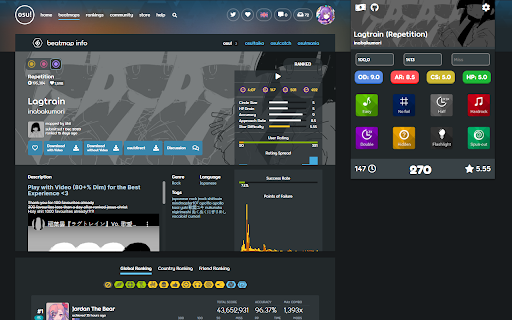
o!pp chrome extension is Calculate PP and beatmap stats for every game mode.
 Calculate performance points (PP) with options to change mods, accuracy, combo, misses etc, for every osu! gamemode. Also displays beatmap stats.
This tool requires osu!api V1 key. You can get in on:
https://osu.ppy.sh/p/api/
http://old.ppy.sh/p/api/
Extension has open source code. You can report issue or request something:
https://github.com/TheEZIC/O-pp
How to install o!pp chrome extension in chrome Browser
You can Follow the below Step By Step procedure to install the o!pp Chrome Extension to your Chrome Web browser.
- Step 1: Go to the Chrome webstore https://chrome.google.com/webstore or download the extension o!pp Chrome Extension Download from https://pluginsaddonsextensions.com
- Step 2: Now search for the o!pp in Chrome Webstore Search and click on the search button.
- Step 3: click on the o!pp Chrome Extension Link
- Step 4: in the next page click on the Add to Chrome button to Download and Install the o!pp extension for your Chrome Web browser .
o!pp Chrome extension Download
Looking for a method to o!pp Download for Chrome then this download link is for you.It is the o!pp Chrome extension download link you can download and install Chrome Browser.
Download o!pp chrome extension (CRX)
-
Calculate pp for a beatmap directly in your browser.
-
osu!のBeatMapページにBloodcat.comのリンクを追加します。
-
Calculates the osu! pp values directly in your web browser
-
This extension will automatically download any beatmap from its page at osu.ppy.sh. For example; If you visit…
-
Preview an osu! beatmap in your browser.
-
osu! koko download beatmaps automatically! (Now working in old site!)