Chrome //
Extensions
Chrome //
Extensions  Chrome
Web store
Chrome
Web store ORF Radiothek Download Chrome Extension

-
Chrome Extension Page
-
Total Number of Extension users:5K +
-
Reviewed by :55 Chrome Users
-
Author Name:
-
['niklas.hoesl']
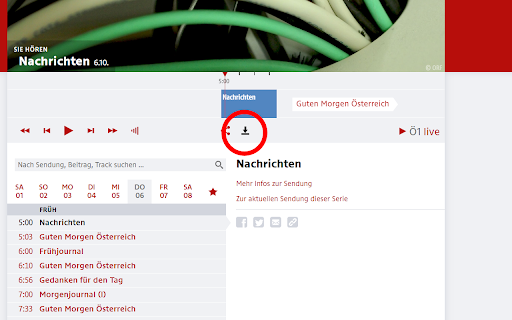
 Mit dieser Anwendung können Sie alle Beiträge der ORF Radiothek herunterladen (und auch von den einzelnen Radio-Seiten via oe1.orf.at). Links unterhalb des Players findet sich der Download Button für den aktuell abspielenden Beitrag. Danach öffnet sich der Beitrag in einem eigenen Tab. Hier muss man noch Strg+S oder Datei -> 'Seite speichern unter' ausführen.

PS: Die neue Version funktioniert jetzt auch mit dem neuen Player!

Viel Spaß!
How to install ORF Radiothek Download chrome extension in chrome Browser
You can Follow the below Step By Step procedure to install the ORF Radiothek Download Chrome Extension to your Chrome Web browser.
- Step 1: Go to the Chrome webstore https://chrome.google.com/webstore or download the extension ORF Radiothek Download Chrome Extension Download from https://pluginsaddonsextensions.com
- Step 2: Now search for the ORF Radiothek Download in Chrome Webstore Search and click on the search button.
- Step 3: click on the ORF Radiothek Download Chrome Extension Link
- Step 4: in the next page click on the Add to Chrome button to Download and Install the ORF Radiothek Download extension for your Chrome Web browser .
ORF Radiothek Download Chrome extension Download
Looking for a method to ORF Radiothek Download Download for Chrome then this download link is for you.It is the ORF Radiothek Download Chrome extension download link you can download and install Chrome Browser.
Download ORF Radiothek Download chrome extension (CRX)
-
Filter Amazon search (if item can be shipped to your location)
-
The safe way to access your personal mail.
-
Find out who targets you with digital advertising
-
Find secure shops in your Google search: install the official Trusted Shops extension
-
Take back your online privacy by using Startpage as your default search engine.
-
The Fake Shop Detector warns you of fraudulent offers, directly in your internet browser!
-
Reads title and track information from several streaming services, and provides these to the Recordify Windows Desktop application
-
Die Erweiterung „orfline - ORF Downloader“ integriert sich nahtlos mit ORF TVthek und fügt einen Button hinzu um Videos zu speichern
-
Allow users in censored countries to use your network connection to access the Tor network.
-
This extension extracts order history from your Amazon account. Amazon used to provide csv reports for US customers only, but it…