Chrome //
Extensions
Chrome //
Extensions  Chrome
Web store
Chrome
Web store Quick Compose for Gmail™ Chrome Extension


-
Chrome Extension Page
-
Total Number of Extension users:2K +
-
Reviewed by :22 Chrome Users
-
Author Name:
-
['browsernative.apps@gmail.com', 'True', 'BrowserNative']
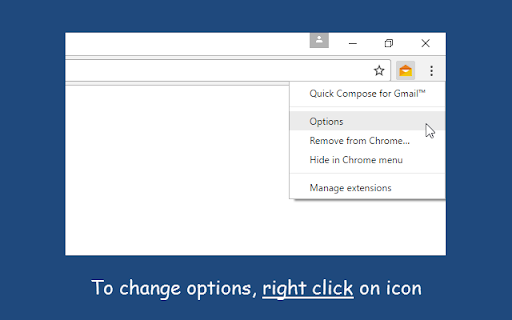
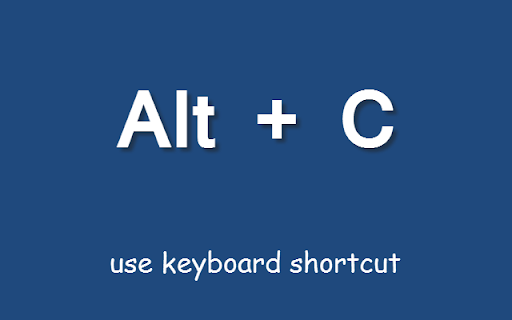
 Use the keyboard shortcut (Alt+C), or the toolbar button. Select text and use the context menu option.

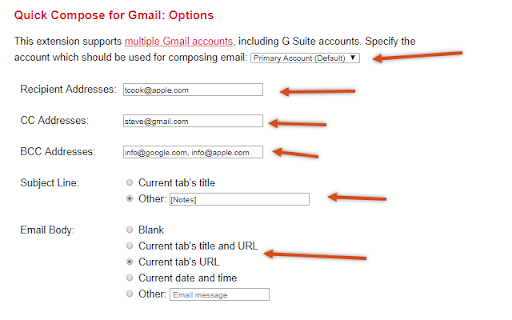
You can also set subject text, recipient addresses and email body. Supports multiple Gmail or G Suite (Google Apps) accounts.

Great tool to send email without opening (and getting distracted by) your Gmail inbox. Read more: https://browsernative.com/quick-compose-gmail-3109/

Send your feedback to apps@browsernative.com

How to install Quick Compose for Gmail™ chrome extension in chrome Browser
You can Follow the below Step By Step procedure to install the Quick Compose for Gmail™ Chrome Extension to your Chrome Web browser.
- Step 1: Go to the Chrome webstore https://chrome.google.com/webstore or download the extension Quick Compose for Gmail™ Chrome Extension Download from https://pluginsaddonsextensions.com
- Step 2: Now search for the Quick Compose for Gmail™ in Chrome Webstore Search and click on the search button.
- Step 3: click on the Quick Compose for Gmail™ Chrome Extension Link
- Step 4: in the next page click on the Add to Chrome button to Download and Install the Quick Compose for Gmail™ extension for your Chrome Web browser .
Quick Compose for Gmail™ Chrome extension Download
Looking for a method to Quick Compose for Gmail™ Download for Chrome then this download link is for you.It is the Quick Compose for Gmail™ Chrome extension download link you can download and install Chrome Browser.
Download Quick Compose for Gmail™ chrome extension (CRX)
-
Quickly disable and enable installed extensions and apps. Whitelist items to remain unaffected.
-
Protect your focus... spend less time on your email.
-
Set Gmail labels or Gmail filters as tabs
-
Adds Google Inbox bundles to Gmail
-
Turn Gmail into a collaboration tool and sync it with your favorite apps like Slack or Trello.
-
Add annotations on your emails to remember something, or to coach how to craft a good email.
-
Add notes to email threads in Gmail and Inbox.
-
Record, send, and listen to audio messages in Gmail. It's the faster, friendlier way to send and receive voicemail.
-
Save websites, articles, etc. directy to Gmail
-
Rename email subjects for Gmail.