Chrome //
Extensions
Chrome //
Extensions  Chrome
Web store
Chrome
Web store Rdio Enhancer Chrome Extension


-
Chrome Extension Page
-
Total Number of Extension users:2K +
-
Reviewed by :117 Chrome Users
-
Author Name:
-
['Matt Harrison']
 Adds some enhancements to rdio.com

Rdio is constantly evolving, if you notice any issues caused by Rdio Enhancer please report an issue here: https://github.com/matt-h/rdio-enhancer/issues Just leaving a review probably wont get your issue noticed.

Donate: https://www.paypal.com/cgi-bin/webscr?cmd=_donations&business=SRNWTE8XDR53Q&lc=US&item_name=Matt&item_number=Rdio%20Enhancer¤cy_code=USD&bn=PP%2dDonationsBF%3abtn_donateCC_LG%2egif%3aNonHosted

Current Features
================
* Favorites
	* Export to CSV
	* View Unavailable Albums
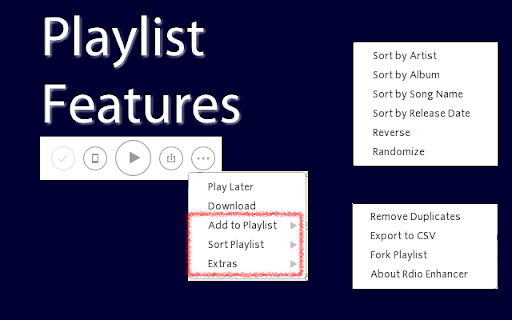
* Playlist Additions
	* Sort Playlist
		* Sort by Artist, Album, Song Name, Release Date, Play Count, Reverse, or Randomize
	* Remove Duplicates
	* Export to CSV
	* Fork Playlist
	* Add playlists to other playlists


Changelog
================

v 2.10.3

* Fixes

	* Fix issue with escaping quotes in csv export

v 2.10.2

* Fixes

	* Fix string issue in escaping quotes

v 2.10.1

* Fixes

	* Escape quotes in csv export [#65]
	* Fix export of larger than 30000 songs [#66]

v 2.10

* New

	* Show Has Listened in Albums/Stations - Thanks Ryan Nauman
	* Add artist top tracks to playlist feature - Thanks Ryan Nauman
	* Scroll to hightlighted track on shared link - Thanks Ryan Nauman
v 2.9

* New

	* Unavailable Albums on Favorites - Thanks nikrowell

v 2.8.5

* Fixes

	* update getTracksInCollection API call to handle large collections over 15000+ tracks

v 2.8.4

* Fixes

	* Handle edge case in which source has no attributes. Thanks @seans23
	* update getTracksInCollection API call to only get 1000 tracks at a time to prevent server errors with large libraries
How to install Rdio Enhancer chrome extension in chrome Browser
You can Follow the below Step By Step procedure to install the Rdio Enhancer Chrome Extension to your Chrome Web browser.
- Step 1: Go to the Chrome webstore https://chrome.google.com/webstore or download the extension Rdio Enhancer Chrome Extension Download from https://pluginsaddonsextensions.com
- Step 2: Now search for the Rdio Enhancer in Chrome Webstore Search and click on the search button.
- Step 3: click on the Rdio Enhancer Chrome Extension Link
- Step 4: in the next page click on the Add to Chrome button to Download and Install the Rdio Enhancer extension for your Chrome Web browser .
Rdio Enhancer Chrome extension Download
Looking for a method to Rdio Enhancer Download for Chrome then this download link is for you.It is the Rdio Enhancer Chrome extension download link you can download and install Chrome Browser.
Download Rdio Enhancer chrome extension (CRX)
-
Scrobble music all around the web!
-
The official chrome extension for Pinboard, the minimalist bookmarking site. Lets you save bookmarks and tab sets easily from Chrome
-
Make Gmail simpler, more capable, and more respectful
-
A better extension for Pinboard (http://pinboard.in). Easy to know current page has been saved or not.
-
This extension allows you to control Deezer from your browser: hot 'key's, popup, notifications... it's all there!
-
The best way to experience 1Password in your browser. Easily sign in to sites, generate passwords, and store secure information.
-
All your favorite radio stations in one extension.
-
A quick way to add links, images, and screenshots to your Dropmark collections.
-
Easily add content to your Feedly while browsing
-
Instapaper browser extension to save links for offline reading.