Chrome //
Extensions
Chrome //
Extensions  Chrome
Web store
Chrome
Web store Recently Closed Chrome Extension
-
Chrome Extension Page
-
Total Number of Extension users:3K +
-
Reviewed by :19 Chrome Users
-
Author Name:
-
['support@mythical5th.com', 'True', 'Mythical 5th']
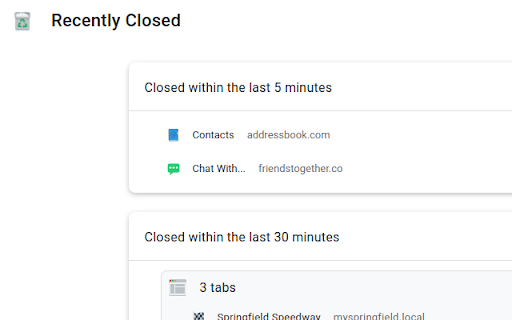
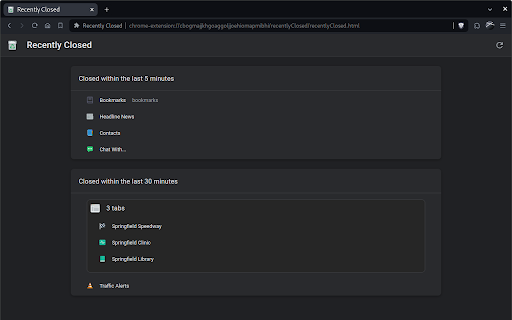
 A page for Recently Closed Tabs, following the design of the History and Downloads pages. Click a Tab or Window to restore it.

Keyboard shortcut: Alt+Z.
To change the shortcut, paste this into the address bar: chrome://extensions/shortcuts

The Trashcan and Window icons in this extension, as well as icons in promotional images, are in the public domain and available from http://paomedia.github.io/small-n-flat/

How to install Recently Closed chrome extension in chrome Browser
You can Follow the below Step By Step procedure to install the Recently Closed Chrome Extension to your Chrome Web browser.
- Step 1: Go to the Chrome webstore https://chrome.google.com/webstore or download the extension Recently Closed Chrome Extension Download from https://pluginsaddonsextensions.com
- Step 2: Now search for the Recently Closed in Chrome Webstore Search and click on the search button.
- Step 3: click on the Recently Closed Chrome Extension Link
- Step 4: in the next page click on the Add to Chrome button to Download and Install the Recently Closed extension for your Chrome Web browser .
Recently Closed Chrome extension Download
Looking for a method to Recently Closed Download for Chrome then this download link is for you.It is the Recently Closed Chrome extension download link you can download and install Chrome Browser.
Download Recently Closed chrome extension (CRX)
-
Backup all opened urls, and restore them next time.
-
Tab Restore helps to restore recently closed tabs and window sessions.
-
View and search through open tabs and browser history.
-
Provides a menu with your previous tabs in order of access - never loose track of you last tab again!
-
A simple history in a one click pop-up: view your recent browser history, recently closed tabs, most visited pages, recent bookmarks
-
Restore, filter or remove recently closed tabs, windows and history including those from other devices.
-
Easily undo closed tabs via your browser's toolbar popup!
-
Your Last Tabs, blah blah blah...
-
Provides 1-click 'Reopen closed tab' with sessions. It's same functionality on Chrome menu.
-
Undo closed tabs with your browsing history