
 Chrome //
Extensions
Chrome //
Extensions  Chrome
Web store
Chrome
Web store Redacted Chrome Extension

-
Chrome Extension Page
-
Total Number of Extension users:374 +
-
Reviewed by :3 Chrome Users
-
Author Name:
-
['webextensions@jamestomasino.com', 'True', 'James Tomasino']
Redacted chrome extension is Redacted -.
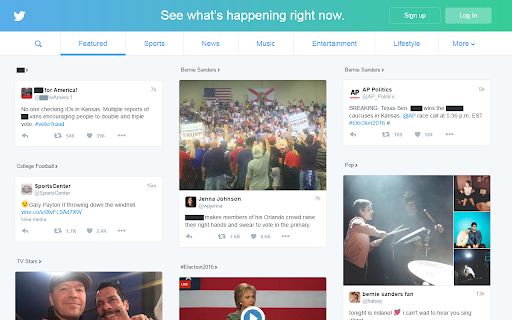
 Are you sick and tired of seeing a name, word, or phrase online? Facebook friends talking about your ex, too many politicians in your Twitter feed, totally over the that reality TV show? Redacted allows you to black-out words or phrases that bother you. Add as many phrases as you like and watch as your browser transforms.

Right click the icon and choose 'options' to choose your phrases. Click the icon to toggle Redacted on/off.
How to install Redacted chrome extension in chrome Browser
You can Follow the below Step By Step procedure to install the Redacted Chrome Extension to your Chrome Web browser.
- Step 1: Go to the Chrome webstore https://chrome.google.com/webstore or download the extension Redacted Chrome Extension Download from https://pluginsaddonsextensions.com
- Step 2: Now search for the Redacted in Chrome Webstore Search and click on the search button.
- Step 3: click on the Redacted Chrome Extension Link
- Step 4: in the next page click on the Add to Chrome button to Download and Install the Redacted extension for your Chrome Web browser .
Redacted Chrome extension Download
Looking for a method to Redacted Download for Chrome then this download link is for you.It is the Redacted Chrome extension download link you can download and install Chrome Browser.
Download Redacted chrome extension (CRX)
-
A stylesheet picker for The SCP Wiki
-
Advanced Profanity Filter helps to clean up bad language on the websites you and your family visit.
-
A simple extension that blurs out words you don't like
-
Blur any element text, image, input or paragraphs with single click.


