Chrome //
Extensions
Chrome //
Extensions  Chrome
Web store
Chrome
Web store Replace Image Locally Chrome Extension

-
Chrome Extension Page
-
Total Number of Extension users:3K +
-
Reviewed by :15 Chrome Users
-
Author Name:
-
['aswinkumar863@gmail.com', 'aswinkumar863']
 Replace Image Locally

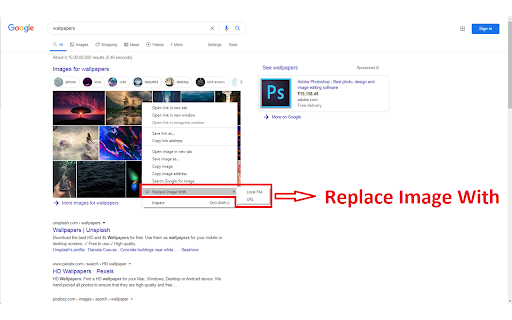
Visualize how your website will appear with the image you have in local or image URL. Helps designers to check whether the images suits for the site. Note that the changes will not preserved after page reload.

This extension is browser based only and it does not store any of your data remotely.

Make sure to reload page youre currently on before you start playing with add on


- Change log -

* v2.0.0 (December 13, 2020):
Migrated to Manifest V3

* v1.2.0 (December 13, 2020):
Bug fixes

* v1.1.0 (April 10, 2020):
URL support added

* v1.0.0 (April 9, 2020):
Initial  Release

How to install Replace Image Locally chrome extension in chrome Browser
You can Follow the below Step By Step procedure to install the Replace Image Locally Chrome Extension to your Chrome Web browser.
- Step 1: Go to the Chrome webstore https://chrome.google.com/webstore or download the extension Replace Image Locally Chrome Extension Download from https://pluginsaddonsextensions.com
- Step 2: Now search for the Replace Image Locally in Chrome Webstore Search and click on the search button.
- Step 3: click on the Replace Image Locally Chrome Extension Link
- Step 4: in the next page click on the Add to Chrome button to Download and Install the Replace Image Locally extension for your Chrome Web browser .
Replace Image Locally Chrome extension Download
Looking for a method to Replace Image Locally Download for Chrome then this download link is for you.It is the Replace Image Locally Chrome extension download link you can download and install Chrome Browser.
Download Replace Image Locally chrome extension (CRX)
-
Replace all images with whatever you want.
-
Replace your target link with what you want
-
Inject HTML, CSS or JavaScript into any web-page. The changes you make are applied every time you visit the specified website(s).
-
Allows you to edit text and images on any website!
-
Make any webpage into a content editable document and modify it via toolbar popup!
-
Edit Anything is a simple extension that allows you to edit text on any website. Click the pencil icon to turn text editing on or…
-
Forget about all the Code chaos and Customize your website in a handy way
-
Edit any page's content by switching to design mode, where you can modify the content and drag images around like a Word Editor