Chrome //
Extensions
Chrome //
Extensions  Chrome
Web store
Chrome
Web store SEOTesting Chrome Extension


-
Chrome Extension Page
-
Total Number of Extension users:2K +
-
Reviewed by :6 Chrome Users
-
Author Name:
-
['developer@seotesting.com', 'The Hive, Unit 15 Efford Farm Business Park Bude EX23 8LT GB', 'True', 'True', 'SEOTesting', 'SEOTesting', 'Sanity Check Ltd']
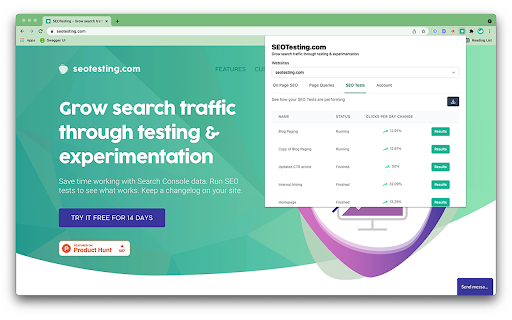
 The SEOTesting Chrome Extension makes it easy to see On-Page SEO Information for your website page.

With a SEOTesting Account, you can see the Page Queries the current page ranks for and other information from the Google Search Console.

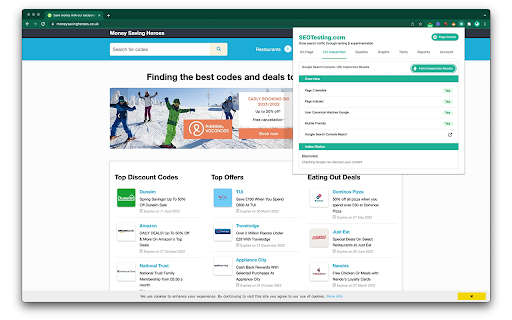
We have now made it even easier to see your Google Search Console URL Inspection information right inside the extension.

You can also check to see how your SEOTesting.com Tests are performing.


How to install SEOTesting chrome extension in chrome Browser
You can Follow the below Step By Step procedure to install the SEOTesting Chrome Extension to your Chrome Web browser.
- Step 1: Go to the Chrome webstore https://chrome.google.com/webstore or download the extension SEOTesting Chrome Extension Download from https://pluginsaddonsextensions.com
- Step 2: Now search for the SEOTesting in Chrome Webstore Search and click on the search button.
- Step 3: click on the SEOTesting Chrome Extension Link
- Step 4: in the next page click on the Add to Chrome button to Download and Install the SEOTesting extension for your Chrome Web browser .
SEOTesting Chrome extension Download
Looking for a method to SEOTesting Download for Chrome then this download link is for you.It is the SEOTesting Chrome extension download link you can download and install Chrome Browser.
Download SEOTesting chrome extension (CRX)
-
Measure metrics for a healthy site
-
a helper to efficiently download crawl data from GSC
-
Extends the new Google Search Console
-
On-page SEO report, broken link checker, redirect tracer, and country changer for search results in one extension.
-
Adapt Worldwide Hreflang Tag Checker Chrome Extension
-
Speed up your SEO routine with SEO extension by Mangools. See the important metrics & website insights on a click.
-
Are you ready to save at least 5 hours/week on daily SEO checks? If your answer is yes, then SEO Pro is exactly what you need.…
-
Live URL checks against robots.txt, meta robots, x-robots-tag & canonical tags. Simple Red, Amber & Green status. An SEO Extension.
-
Enhance Google Trends data for better insights
-
Get SEO insights at the click of a button to any website you're currently on. Built by full-time SEO's for daily analysis.