Chrome //
Extensions
Chrome //
Extensions  Chrome
Web store
Chrome
Web store ShowAsIs Chrome Extension


-
Chrome Extension Page
-
Total Number of Extension users:4K +
-
Reviewed by :7 Chrome Users
-
Author Name:
-
['haebin.na@gmail.com', 'haebin']
 Google Slide has CJK font issue; What You See Is NOT What You Get in presentation mode. This extension solves the issue by using the slide editor in presentation mode.

Follow simple 3 steps to experience WYSIWYG for Chinese, Japanese and Korean.
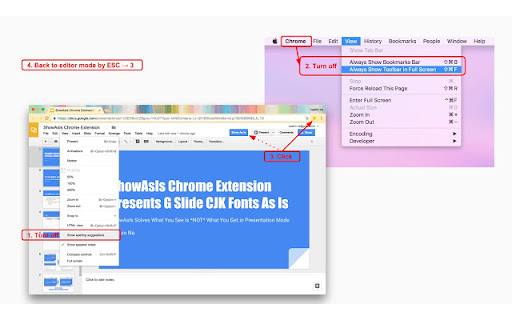
1. Slide settings;
  . Turn off spelling suggestion under View of Google Slide. (one time, but if you want the spell check then turn on when you are done with presentation.)
  . Turn off View > Show ruler, Show speaker notes, Show filmstrip, Show comments
  . Hide Sidebar by clicking the right arrow  >  at the bottom of Sidebar.
2. Turn off fullscreen toolbar under View of Chrome. (one time)
3. Click Show As Is button in Google Slide or extension logo, voila~

To go back, ESC (or Command + Control + F on new Mac) to exit fullscreen and click the ShowAsIs extension logo again or refresh the slide.


NOTE:
 * Animations wont work.
 * If up & down doesnt work, please click the slide page and try it.
 * If comments exist then share the doc in View Only mode and then do Show As Is. This will fix the problem without resolving all the comments.
 * Even though it requires browser history for auto fullscreen feature, it doesnt do anything with browser history. If you cant believe it then here is the code. https://github.com/haebin/ShowAsIs


* Release Note:
v.1.1.3 - Bugfix for Google Slide UI code update.
v.1.1.2 - Fixed extension not working in Viewer mode.
v.1.1.1 - Icons added.
v.1.1.0 - Added Show As Is button in G Slide and automatic fullscreen.
v.1.0.1 - Minor updates.
v.1.0.0 - Initial version.

How to install ShowAsIs chrome extension in chrome Browser
You can Follow the below Step By Step procedure to install the ShowAsIs Chrome Extension to your Chrome Web browser.
- Step 1: Go to the Chrome webstore https://chrome.google.com/webstore or download the extension ShowAsIs Chrome Extension Download from https://pluginsaddonsextensions.com
- Step 2: Now search for the ShowAsIs in Chrome Webstore Search and click on the search button.
- Step 3: click on the ShowAsIs Chrome Extension Link
- Step 4: in the next page click on the Add to Chrome button to Download and Install the ShowAsIs extension for your Chrome Web browser .
ShowAsIs Chrome extension Download
Looking for a method to ShowAsIs Download for Chrome then this download link is for you.It is the ShowAsIs Chrome extension download link you can download and install Chrome Browser.
Download ShowAsIs chrome extension (CRX)
-
Experience the Klaytn blockchain wallet in your browser
-
A free easy-to-use web scraping tool. Extract Web data in a few clicks
-
Study App for video note-taking with ChatGPT
-
새 탭을 열 때마다 워크룸 프레스와 작업실유령 도서에서 발췌한 문장을 드러냅니다.
-
Typed Web Extension
-
Greepick
-
한국어 맞춤법 검사기입니다. 검사를 원하는 부분을 드레그하여 선택 후 아이콘 또는 단축키를 누르면 검사 결과가 나옵니다..
-
영한, 영영, 영어유의어, 일한, 일일, 중한, 중중한, 한자, 프랑스어, 독일어, 스페인어, 러시아어 단어 또는 문장에 마우스를 올리면 툴팁 사전이 뜹니다.
-
영어 단어의 뜻과 예문을 쉽게 찾을 수 있습니다.
-
새 탭에서 시작되는 커리어 성장, 매일 성장하고 더 멋지게 일하세요!