Chrome //
Extensions
Chrome //
Extensions  Chrome
Web store
Chrome
Web store Timewarp Chrome Extension


-
Chrome Extension Page
-
Total Number of Extension users:10K +
-
Reviewed by :268 Chrome Users
-
Author Name:
-
['terry@mindfulsuite.com', 'True', 'Mindful Suite']
 When you need to get things done but just cant stop checking your Gmail, Facebook, Youtube, and Reddit etc, Timewarp comes to rescue.

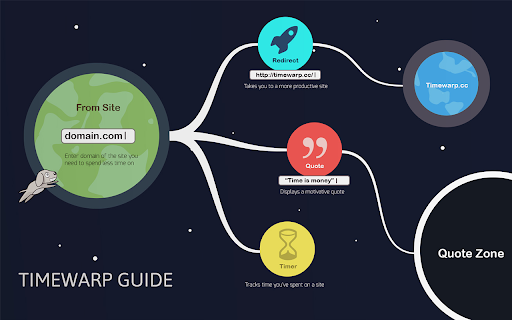
By setting up wormholes, you will be kindly reminded that you cant afford to procrastinate at the moment. There are three kinds of wormholes you can create:

Redirect - Takes you to a more productive site which you specify
Quote - Shows your most motivative quote
Timer - Displays the time youve spent on the site today

--------------------------------------------------
3.0 is out! Feb 2, 2020

Fixed the issue with not able to block website that uses service workers such as Twitter.
Timewarp is now part of Mindful Suite! Thank you for your support. Well make Timewarp better!

--------------------------------------------------
2.6 is out! Mar 23, 2015

By request, you can now turn off social buttons, thats one less distraction!
But we do appreciate sharing Timewarp with your friends. Its the only way to help us do a better job updating Timewarp! Good luck!

--------------------------------------------------
2.0 is out! July 18, 2015

Thanks everyone who suggested features and found bugs!
Ive been listening and building features as quick as possible.

Many wanted to combine timer with quote or redirects, now youve got it!

You can allocate the time you can spend on a site per day. Once the time is up, you will be taken to the quote or the alternative site, and be productive! Dont abuse the timer ;-).

Also the timer will not continue counting if youve switched to another app with the current site open.
--------------------------------------------------

Never feel guilty, Time Warp loves you and will never blame you.

Like our facebook page! https://www.facebook.com/timewarpusers

Credit: Thanks http://www.entypo.com/ for the great icons!

--------------------------------------------------

Weve been mentioned by LifeHacker! Yay!
http://lifehacker.com/time-warp-keeps-you-focused-helps-you-avoid-distractin-749201935


How to install Timewarp chrome extension in chrome Browser
You can Follow the below Step By Step procedure to install the Timewarp Chrome Extension to your Chrome Web browser.
- Step 1: Go to the Chrome webstore https://chrome.google.com/webstore or download the extension Timewarp Chrome Extension Download from https://pluginsaddonsextensions.com
- Step 2: Now search for the Timewarp in Chrome Webstore Search and click on the search button.
- Step 3: click on the Timewarp Chrome Extension Link
- Step 4: in the next page click on the Add to Chrome button to Download and Install the Timewarp extension for your Chrome Web browser .
Timewarp Chrome extension Download
Looking for a method to Timewarp Download for Chrome then this download link is for you.It is the Timewarp Chrome extension download link you can download and install Chrome Browser.
Download Timewarp chrome extension (CRX)
-
Beautifully interrupts mindless browsing, and gets you back to your life.
-
Enforces a 25min/5min workflow: 25 minutes of distraction-free work, followed by 5 minutes of break. Repeat as necessary.
-
Set your work and break time and let this extension block the sites that are keeping you away from your goals.
-
Reminds you to sit up straight with pop-up notifications at specified time intervals.
-
Transform Your Browser To Improve Focus and Increase Productivity
-
Want to be productive? Let the Productivity Owl guide you to accomplishment.
-
Regulated distraction.
-
Replaces the new tab page with a personal dashboard to help you live a healthy lifestyle, build habits, and achieve long term goals.
-
Boost your productivity by limiting the amount of time you spend on time-wasting websites.
-
Pause distracting websites before they open. Be mindful and intentional with your browsing using this simple extension.