Chrome //
Extensions
Chrome //
Extensions  Chrome
Web store
Chrome
Web store View Image Chrome Extension

-
Chrome Extension Page
-
Total Number of Extension users:2K +
-
Reviewed by :24 Chrome Users
-
Author Name:
-
['support@thebyteseffect.com', 'True', 'Byteseffect']
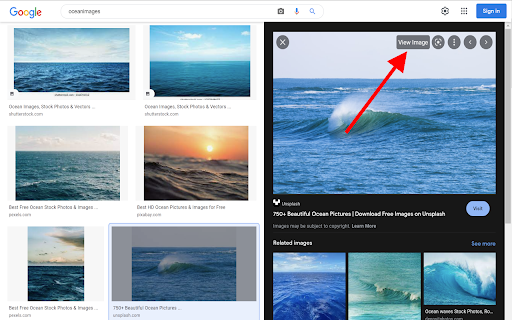
 Add View Image in new tab functionality to Google image search results.
This works on all the google websites.
In the mid of 2018, Google removed View Image button, This extension let you bring back the view image button in the chrome. Just click on the View Image button on the top right hand side of the image to view the image in a new tab.

How to install View Image chrome extension in chrome Browser
You can Follow the below Step By Step procedure to install the View Image Chrome Extension to your Chrome Web browser.
- Step 1: Go to the Chrome webstore https://chrome.google.com/webstore or download the extension View Image Chrome Extension Download from https://pluginsaddonsextensions.com
- Step 2: Now search for the View Image in Chrome Webstore Search and click on the search button.
- Step 3: click on the View Image Chrome Extension Link
- Step 4: in the next page click on the Add to Chrome button to Download and Install the View Image extension for your Chrome Web browser .
View Image Chrome extension Download
Looking for a method to View Image Download for Chrome then this download link is for you.It is the View Image Chrome extension download link you can download and install Chrome Browser.
Download View Image chrome extension (CRX)
-
Search similar image by 'Google search by Image'.
-
Better Chrome image viewing experience
-
Changes the behaviour of Google Images™ so that clicking on an image thumbnail takes you directly to the full-size image.
-
Bring back the view image button for Google image search results.
-
-
Enhances the browser's default image viewer
-
Make the images for preview
-
This extension adds back View Image button on Google Images™ results
-
Re-implements the Google Images' 'View Image' button.
-
Restores Google Images to how it appeared before August 6, 2019