Chrome //
Extensions
Chrome //
Extensions  Chrome
Web store
Chrome
Web store Voice Search Chrome Extension


-
Chrome Extension Page
-
Total Number of Extension users:100K +
-
Reviewed by :2453 Chrome Users
-
Author Name:
-
['support@ispeech.org', '211 Warren Street Newark, NJ 07103 US', 'True', 'iSpeech', 'iSpeech Inc', 'iSpeech Inc']
 Voice Search uses the power of speech recognition to search the web! Instead of typing use voice input to quickly and easily search for the things you care about.

Dictate your essays on Google Docs in record time and comment on social media with ease -- using just your voice!

Search by speaking: just click on the microphone and say 'kittens' to search for kittens. If you specifically want pictures of kittens, say 'google images kittens'. Want to learn more about World War II? Say 'wikipedia world war two'.

Voice Search comes pre-loaded with the following default services: Google, Wikipedia, YouTube, Bing, Yahoo, DuckDuckGo and Wolfram|Alpha. You can also add your own user-defined search engines.

Please remember: this extension requires a microphone!

Features:
 - Voice input to Google, DuckDuckGo, Wikipedia, Google Maps, YouTube just to name a few!
 - Dictation for writing essays and comments on many websites
 - Speech recognition and voice commands let you quickly search with just one click.
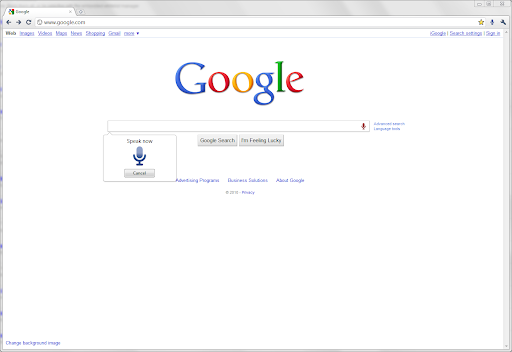


How to install Voice Search chrome extension in chrome Browser
You can Follow the below Step By Step procedure to install the Voice Search Chrome Extension to your Chrome Web browser.
- Step 1: Go to the Chrome webstore https://chrome.google.com/webstore or download the extension Voice Search Chrome Extension Download from https://pluginsaddonsextensions.com
- Step 2: Now search for the Voice Search in Chrome Webstore Search and click on the search button.
- Step 3: click on the Voice Search Chrome Extension Link
- Step 4: in the next page click on the Add to Chrome button to Download and Install the Voice Search extension for your Chrome Web browser .
Voice Search Chrome extension Download
Looking for a method to Voice Search Download for Chrome then this download link is for you.It is the Voice Search Chrome extension download link you can download and install Chrome Browser.
Download Voice Search chrome extension (CRX)
-
Search the web with your voice
-
Google voice search in languages different from your OS and location settings.
-
Select and Speak uses iSpeech’s human-quality text-to-speech (TTS) to read any selected text in the browser. It includes many…
-
Control your browser just by talking to it.
-
A customizable personal dashboard on your new tab page featuring 50+ widgets, breathtaking backgrounds and much more.
-
Voice search using any search engine easily!
-
It is very easy! Just say what you want to find.
-
Make calls with Google Voice with a click.
-
Use Voice Recognition to fill out forms and dictate email with speech to text. Control the Internet with custom voice commands!
-
A remarkably customizable personal homepage featuring 50+ widgets, breathtaking backgrounds and much more.