Chrome //
Extensions
Chrome //
Extensions  Chrome
Web store
Chrome
Web store Web Disability Simulator Chrome Extension


-
Chrome Extension Page
-
Total Number of Extension users:10K +
-
Reviewed by :14 Chrome Users
-
Author Name:
-
['Metamatrix']
The Web Disability Simulator lets you experience how people with different disabilities or inadequate abilities perceive a web site. Simulate color blindness, low vision, dyslexia and more. An easy-to-use tool both to increase understanding and lower the threshold to test accessibility on a website.
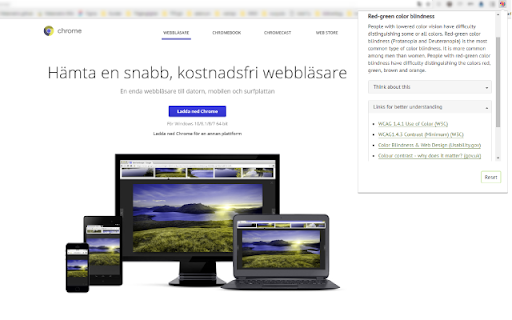
How to install Web Disability Simulator chrome extension in chrome Browser
You can Follow the below Step By Step procedure to install the Web Disability Simulator Chrome Extension to your Chrome Web browser.
- Step 1: Go to the Chrome webstore https://chrome.google.com/webstore or download the extension Web Disability Simulator Chrome Extension Download from https://pluginsaddonsextensions.com
- Step 2: Now search for the Web Disability Simulator in Chrome Webstore Search and click on the search button.
- Step 3: click on the Web Disability Simulator Chrome Extension Link
- Step 4: in the next page click on the Add to Chrome button to Download and Install the Web Disability Simulator extension for your Chrome Web browser .
Web Disability Simulator Chrome extension Download
Looking for a method to Web Disability Simulator Download for Chrome then this download link is for you.It is the Web Disability Simulator Chrome extension download link you can download and install Chrome Browser.
Download Web Disability Simulator chrome extension (CRX)
-
Visualise tab order with ease
-
Analyze a web page or portion of a web page for conformance with WCAG 2.0 Color Contrast requirements.
-
Evaluate web accessibility within your browser.
-
This extension simulates dyslexia. Just how if life gives you melons then you might be dyslexic.
-
A web-powered screen reader
-
A web browser extension for checking accessibility issues
-
Just click the tota11y icon to run tota11y from Khan Academy and visualize how your site performs with assistive technologies.
-
Check the contrast between different colour combinations against WCAG standards
-
Funkify is an extension for Chrome that helps you experience the web and interfaces through the eyes of extreme users with…
-
Accessibility Insights for Web helps developers quickly find and fix accessibility issues.