Chrome //
Extensions
Chrome //
Extensions  Chrome
Web store
Chrome
Web store Web Inspector Chrome Extension


-
Chrome Extension Page
-
Total Number of Extension users:20K +
-
Reviewed by :30 Chrome Users
-
Author Name:
-
['True', 'bensampaio']
 Have you ever wanted to know which is that stylish font used on a certain website? Or the text color used?

Or have you ever wanted to know the dimensions of an image without having to download it? Or a audio / video source URL?

If yes, this is the extension for you. Install Web Inspector on Chrome and on a certain page click on the extension icon. Then mouse over a certain element you are curious about and click on it. A window will be displayed around this item with information about the font used, the text color, the background color, the source URL (in case it is a multimedia item), among others. If you dont want to inspect any more element on the page just click on the extension icon again to turn it off.

In case you would like to contribute you can find our GitHub page here: https://github.com/Anakin88/chrome-extension-web_inspector.

Use it to inspect the Web. Hope you like it!
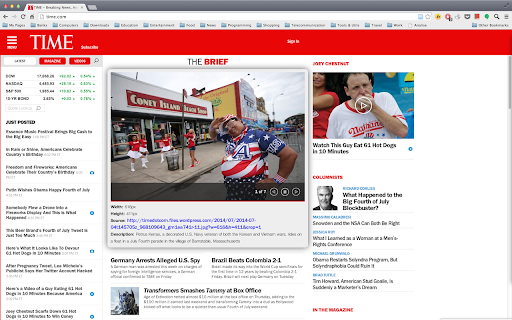
How to install Web Inspector chrome extension in chrome Browser
You can Follow the below Step By Step procedure to install the Web Inspector Chrome Extension to your Chrome Web browser.
- Step 1: Go to the Chrome webstore https://chrome.google.com/webstore or download the extension Web Inspector Chrome Extension Download from https://pluginsaddonsextensions.com
- Step 2: Now search for the Web Inspector in Chrome Webstore Search and click on the search button.
- Step 3: click on the Web Inspector Chrome Extension Link
- Step 4: in the next page click on the Add to Chrome button to Download and Install the Web Inspector extension for your Chrome Web browser .
Web Inspector Chrome extension Download
Looking for a method to Web Inspector Download for Chrome then this download link is for you.It is the Web Inspector Chrome extension download link you can download and install Chrome Browser.
Download Web Inspector chrome extension (CRX)
-
Adds a toolbar button with various web developer tools.
-
View current page sources: HTML + Javascript + CSS
-
Detect web applications and javascript libraries run while browsing websites. VeryCoolUsefulApps.
-
Firebug Lite - a port of the popular Firebug for Google Chrome.
-
Inspect element for content, and margin.
-
Dev Tools sidebar that aids finding unique CSS selectors for Selenium WebDriver tests.
-
A simple CSS property viewer.
-
EDITS ANY PAGE! Good for pranking and trolling your friends! A very funny extension. Update 11/28/2016 Good news! Version 3 may…
-
Live preview of CSS/Less/Sass code changes. Auto-save file, autocomplete, Less/Sass to CSS, beautify, CSS reloader, lint, ...
-
View source code of Chrome extensions, Firefox addons or Opera extensions (crx/nex/xpi) from the Chrome web store and elsewhere.