Chrome //
Extensions
Chrome //
Extensions  Chrome
Web store
Chrome
Web store WordUp Chrome Extension


-
Chrome Extension Page
-
Total Number of Extension users:9K +
-
Reviewed by :74 Chrome Users
-
Author Name:
-
['paymon@geeks.ltd.uk', 'True', 'Geeks Ltd']
 WordUp is a revolutionary app for learning new English words and improving your vocabulary. It maps out where the gaps in your knowledge are, and creates a personalised learning plan that focuses on one word at a time.

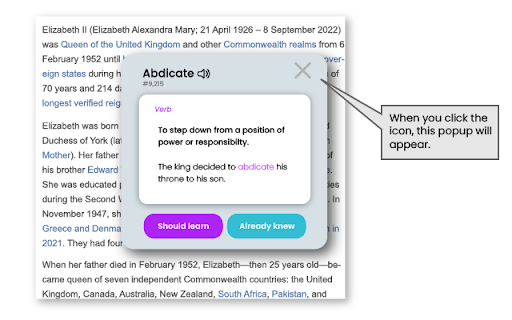
This Chrome Extension allows you to complete your WordUp knowledge map as you browse the web. It will scan the page youre looking at, and check every word on the page against your WordUp knowledge map.

- If you have declared that you know the word, it will do nothing.
- If you have declared that you dont, then it will show a red underline, helping you to quickly look up the words definitions with a single click.
- If you have not declared it either way, it will show a green line below the word, which you can then click to see the definitions and also declare if you knew it or not.

This helps you in 2 ways. Firstly, it will help you to complete your WordUp knowledge map. Secondly, and once, your knowledge map is more complete, it will cleverly highlight any word that you dont know on any web page, and help you look it up with no effort!

This helps you to build WordUp into your everyday life and make the most out of your WordUp knowledge map in your day-to-day life.

With WordUp, you are in control of your knowledge.


How to install WordUp chrome extension in chrome Browser
You can Follow the below Step By Step procedure to install the WordUp Chrome Extension to your Chrome Web browser.
- Step 1: Go to the Chrome webstore https://chrome.google.com/webstore or download the extension WordUp Chrome Extension Download from https://pluginsaddonsextensions.com
- Step 2: Now search for the WordUp in Chrome Webstore Search and click on the search button.
- Step 3: click on the WordUp Chrome Extension Link
- Step 4: in the next page click on the Add to Chrome button to Download and Install the WordUp extension for your Chrome Web browser .
WordUp Chrome extension Download
Looking for a method to WordUp Download for Chrome then this download link is for you.It is the WordUp Chrome extension download link you can download and install Chrome Browser.
Download WordUp chrome extension (CRX)
-
Productivity and focus with Todo List,Calendar,Weather,Background Photo,Dark theme, Organize Bookmark, Folder, Search, Font.
-
VocabTracker is inspired by LingQ, Readlang and LWT: it helps you track your vocabulary on any web page.
-
This extension provides the ability to create anki cards directly from Google Chrome on your Anki Desktop.
-
Translate and save words from browser using DuoCards
-
Translate words and phrases while browsing the web, and easily replenish your foreign languages dictionary using flashcards.
-
Looks up online Oxford Advanced Learner's Dictionary for the selected text
-
Master vocabulary effortlessly with the full cycle process.
-
Developed by Expert Teachers
-
Looks up the selected text on Cambridge Dictionary
-
Translations and other useful features for vocabulary.com (unofficial)