Chrome //
Extensions
Chrome //
Extensions  Chrome
Web store
Chrome
Web store Force.com LOGINS Chrome Extension


-
Chrome Extension Page
-
Total Number of Extension users:20K +
-
Reviewed by :189 Chrome Users
-
Author Name:
-
['takasu.biz@gmail.com', 'True', 'takasu.biz']
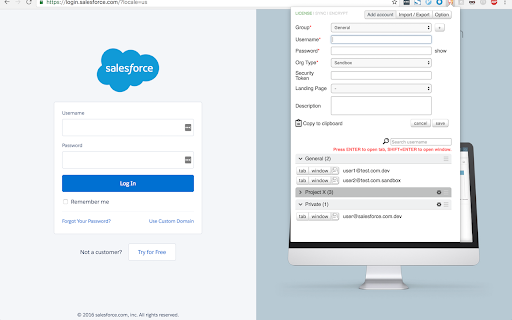
 This extension helps you manage your Salesforce login credentials and lets you quickly login.

If you are a Salesforce admin or developer who needs to manage multiple orgs and login credentials, you must be tired of entering username and password every time they move from an account to the other.

This extension helps you;

- manage your salesforce.com login information (usrename, password, security token, and description).
- quickly login to salesforce.com with new tab, new window and incognito window.
- sync your login information across your devices
- automatically takes backup of account information to your Google Drive

Please refer to http://forcecomlogins.jimdo.com/ for more details.

I hope you find this useful!



How to install Force.com LOGINS chrome extension in chrome Browser
You can Follow the below Step By Step procedure to install the Force.com LOGINS Chrome Extension to your Chrome Web browser.
- Step 1: Go to the Chrome webstore https://chrome.google.com/webstore or download the extension Force.com LOGINS Chrome Extension Download from https://pluginsaddonsextensions.com
- Step 2: Now search for the Force.com LOGINS in Chrome Webstore Search and click on the search button.
- Step 3: click on the Force.com LOGINS Chrome Extension Link
- Step 4: in the next page click on the Add to Chrome button to Download and Install the Force.com LOGINS extension for your Chrome Web browser .
Force.com LOGINS Chrome extension Download
Looking for a method to Force.com LOGINS Download for Chrome then this download link is for you.It is the Force.com LOGINS Chrome extension download link you can download and install Chrome Browser.
Download Force.com LOGINS chrome extension (CRX)
-
Productivity tools for Salesforce administrators and developers to inspect data and metadata directly from the Salesforce UI.
-
Enables you to login in SalesForce (Force.com) with one click.
-
Makes it easy to login as another user. Maintains the page currently being viewed.
-
Powerful Salesforce developer tools, loved by over 50K developers worldwide.
-
Toolkit provides Package.xml out of change sets. Test coverage export functionality. Fast navigation to User detail. Big Query.
-
Compare Record data values and object metadata in Salesforce
-
By using the advanced quick find you can get your code few clicks shorter. Also, you can search any string your code
-
ORGanizer - The best Salesforce Extension ever
-
Best in class solution to manage your salesforce credentials. Completely free.
-
A simple search box on top of all configuration items of salesforce setup items.