Chrome //
Extensions
Chrome //
Extensions  Chrome
Web store
Chrome
Web store Add to Microsoft To Do Chrome Extension


-
Chrome Extension Page
-
Total Number of Extension users:30K +
-
Reviewed by :78 Chrome Users
-
Author Name:
-
['pavlo@ukhan.in.ua', 'True', 'Pavlo Ukhan']
 ❗ This is not an official Microsoft extension.

The extension allows you to add information about the current page to ToDo: title, selected text, and URL.

FEATURES
* Adding using the extension interface - you can add page information, select the desired list, and set the reminder time beforehand.
* Quick Add - adds page (or link) information to the default list without demonstrating the extension interface.
* Assigning keyboard shortcuts for both types of operations.
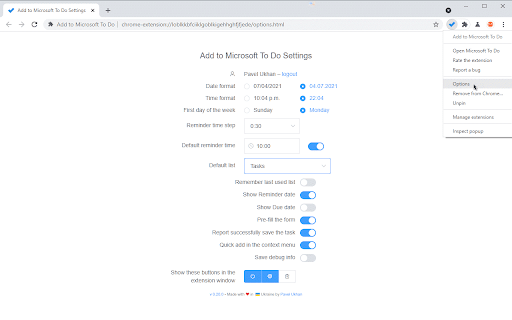
* Flexible configuration of the expansion interface: time and date formats, default list (with ability to remember last used), default reminder time (or last used).

PRIVACY POLICY

https://github.com/ukhan/add-to-ms-todo/blob/master/PRIVACY.md

UNEXPECTED BEHAVIOR
* If more than 24 hours have passed since the previous use of the extension, then when you start it you will see a browser tab automatically opening in the background. The extension uses this tab to obtain an updated access token. It is due to the features of the Microsoft identity platform. Details: https://github.com/MicrosoftDocs/azure-docs/issues/62164.

KNOWN DISADVANTAGES
* When you select a list, the lists are shown in an un-grouped form. Reason: the public API does not allow you to get information about grouping lists.
* This is not an official extension. But unfortunately, theres no official extension at this time – https://todo.uservoice.com/forums/597175-feature-suggestions/suggestions/32661145-browser-extension-firefox-chrome-edge-opera-s
* The extension requires the seemingly unnecessary 'Read browsing history' permission. But this permission is needed for an alternative implementation of user authentication. The reason is the inability to use the stock chrome.identity.launchWebAuthFlow with the Microsoft identity platform. More details: https://github.com/MicrosoftDocs/azure-docs/issues/62164.

How to install Add to Microsoft To Do chrome extension in chrome Browser
You can Follow the below Step By Step procedure to install the Add to Microsoft To Do Chrome Extension to your Chrome Web browser.
- Step 1: Go to the Chrome webstore https://chrome.google.com/webstore or download the extension Add to Microsoft To Do Chrome Extension Download from https://pluginsaddonsextensions.com
- Step 2: Now search for the Add to Microsoft To Do in Chrome Webstore Search and click on the search button.
- Step 3: click on the Add to Microsoft To Do Chrome Extension Link
- Step 4: in the next page click on the Add to Chrome button to Download and Install the Add to Microsoft To Do extension for your Chrome Web browser .
Add to Microsoft To Do Chrome extension Download
Looking for a method to Add to Microsoft To Do Download for Chrome then this download link is for you.It is the Add to Microsoft To Do Chrome extension download link you can download and install Chrome Browser.
Download Add to Microsoft To Do chrome extension (CRX)
-
Clip web pages directly to Trello
-
Stay on top of emails with Todoist for Gmail
-
Better organise your Google Keep notes
-
Access and manage all your Google Tasks™ directly in Chrome
-
Save your passwords, addresses and payment info, and automatically fill them on sites you visit.
-
Save anything on the web to OneNote. Clip it to OneNote, organize and edit it, then access it from any device.
-
You no longer need to open Gmail or Google Calendar to access Google Tasks. Extension allows you to open Google Tasks in new tab.
-
Any.do helps you remember everything you have to do.
-
Standalone Desktop app for Google Tasks. Export and share your Google Tasks lists in one click.
-
Instantly create a new TickTick task with a link to the current page in just one click!