Chrome //
Extensions
Chrome //
Extensions  Chrome
Web store
Chrome
Web store Microsoft Autofill Chrome Extension


-
Chrome Extension Page
-
Total Number of Extension users:100K +
-
Reviewed by :1730 Chrome Users
-
Author Name:
-
['BrowserExtensions@microsoft.com', 'One Microsoft Way Redmond, WA 98052 US', 'True', 'True', 'Microsoft Corporation', 'Microsoft Corporation', 'Microsoft Corporation']
 Microsoft Autofill lets you save your passwords, addresses and payment info. You can automatically fill them on all your devices – Windows, macOS, Android, and iOS.

With Microsoft Autofill you can:
- Avoid the hassle of forgetting passwords and other data by saving them online
- Save time by automatically filling your passwords, addresses and payment info on the sites you visit
- Access your saved passwords and addresses on all your devices

This extension is for Google Chrome. If you’re using Microsoft Edge, you already have Microsoft Autofill—just go to Settings and more (…) > Settings > Profiles > Passwords.

To autofill passwords on Android and iOS, download the Microsoft Authenticator app.

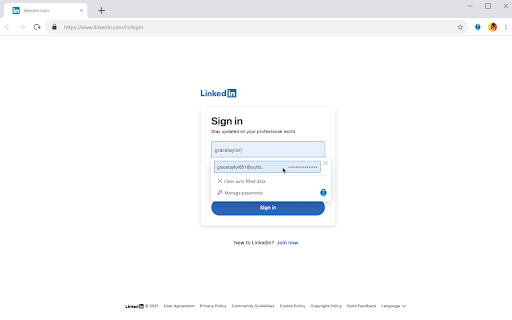


How to install Microsoft Autofill chrome extension in chrome Browser
You can Follow the below Step By Step procedure to install the Microsoft Autofill Chrome Extension to your Chrome Web browser.
- Step 1: Go to the Chrome webstore https://chrome.google.com/webstore or download the extension Microsoft Autofill Chrome Extension Download from https://pluginsaddonsextensions.com
- Step 2: Now search for the Microsoft Autofill in Chrome Webstore Search and click on the search button.
- Step 3: click on the Microsoft Autofill Chrome Extension Link
- Step 4: in the next page click on the Add to Chrome button to Download and Install the Microsoft Autofill extension for your Chrome Web browser .
Microsoft Autofill Chrome extension Download
Looking for a method to Microsoft Autofill Download for Chrome then this download link is for you.It is the Microsoft Autofill Chrome extension download link you can download and install Chrome Browser.
Download Microsoft Autofill chrome extension (CRX)
-
Protect yourself against online threats, like phishing and malicious websites, with real-time protection from Microsoft.
-
Add-on for enabling web automation. This web extension is compatible with Power Automate for desktop version 2.26 or earlier.
-
Navigation menu of Chrome URLs: internal pages of the Google Chrome browser.
-
This extension autofills logins, passwords, and credit cards from SafeInCloud application.
-
DualSafe Password Manager extension lets you safely manage passwords in one place to autosave, autofill & access them anytime.
-
It's the easiest way to save anything from the web to your ToDo lists.
-
View untrusted websites in a separate Microsoft Edge browsing window to help protect your device from advanced threats.
-
iCloud Passwords lets you fill passwords from iCloud Keychain when signing in to websites using Chrome.
-
An extension that will allow the quick and easy launching of Google services, the same as the launcher in Gmail
-
You can easy go to icloud