Chrome //
Extensions
Chrome //
Extensions  Chrome
Web store
Chrome
Web store Advanced Font Settings Chrome Extension

-
Chrome Extension Page
-
Total Number of Extension users:600K +
-
Reviewed by :1323 Chrome Users
-
Author Name:
-
['patrickkettner@google.com', '111 8th Ave new york, NY 10011 US', 'True', 'True', 'Patrick Kettner', 'Patrick Kettner', 'Google']
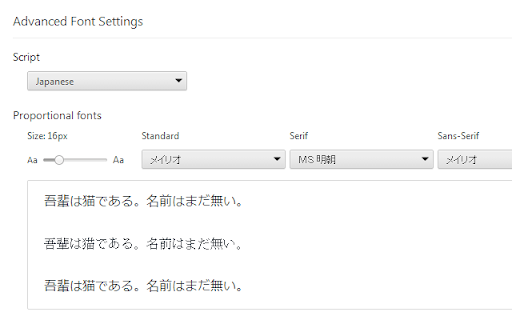
 This extension allows you to customize font settings for different language scripts. For example, you can set the default font for Simplified Chinese content to be different than the font for Japanese content. The settings are per-script (as specified in ISO 15924) rather than per-language. For example, there is a single setting for Cyrillic script rather than separate ones for Russian, Ukrainian, etc.

Chrome will use the font settings controlled by this extension when BOTH of the following are true:
1) The web page has declared the language of the content (e.g., by using the HTML lang attribute); and
2) The web page has not specified a font to use.

To use this extension, add it to Chrome and then go to chrome://extensions and click on the 'Options' link for this extension.

How to install Advanced Font Settings chrome extension in chrome Browser
You can Follow the below Step By Step procedure to install the Advanced Font Settings Chrome Extension to your Chrome Web browser.
- Step 1: Go to the Chrome webstore https://chrome.google.com/webstore or download the extension Advanced Font Settings Chrome Extension Download from https://pluginsaddonsextensions.com
- Step 2: Now search for the Advanced Font Settings in Chrome Webstore Search and click on the search button.
- Step 3: click on the Advanced Font Settings Chrome Extension Link
- Step 4: in the next page click on the Add to Chrome button to Download and Install the Advanced Font Settings extension for your Chrome Web browser .
Advanced Font Settings Chrome extension Download
Looking for a method to Advanced Font Settings Download for Chrome then this download link is for you.It is the Advanced Font Settings Chrome extension download link you can download and install Chrome Browser.
Download Advanced Font Settings chrome extension (CRX)
-
Extension that lets the user change the font text size, font type, font color and background color on a page.
-
Choose a font from the Google Font directory with a few text styling options and preview the font styles on the current tab.
-
替换字体的中文部分为雅黑
-
Force the use of custom fonts for web pages. If you are professional in using CSS, the extension 'Stylish' is suggested.
-
Font Rendering Enhancer for Chrome. Darker and clearer text on the pages (http and https).
-
A customizable color filter applied to webpages to improve color perception.
-
Force the use of “Microsoft YaHei” font for CJK text (though Chinese/Japanese/Korean text is not very useful for foreign users).
-
MSゴシック系フォントやArial Unicode MS等、読みにくいフォントをメイリオで置き換えて表示します。
-
The easiest font setting extension.
-
Changes all the UI font to a user-given font.