
 Chrome //
Extensions
Chrome //
Extensions  Chrome
Web store
Chrome
Web store Asciidoctor.js Live Preview Chrome Extension


-
Chrome Extension Page
-
Total Number of Extension users:20K +
-
Reviewed by :75 Chrome Users
-
Author Name:
-
['hello@yuzutech.fr', 'True', 'Guillaume Grossetie']
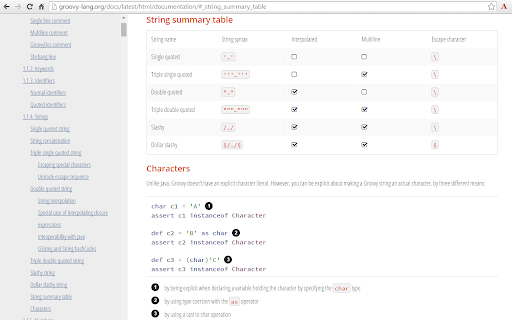
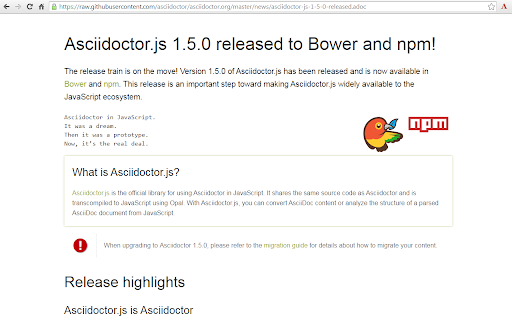
 This project uses Asciidoctor.js to render AsciiDoc as HTML.

Usage

 1. Check Allow access to file URLs in chrome://extensions
 2. Open local or remote .ad, .adoc, .asc, .asciidoc file in Chrome
 3. Enjoy!

Options

The extension can be configured via an options page.

To open the options page, right-click the extension icon and choose Options on the menu. You can also go to chrome://extensions and click the Options link.

The options page let you add custom attributes or change the theme of the AsciiDoc HTML output.

Changelog

2.7.0

• Fix MathJax equation numbering (#412)
• Upgrade Asciidoctor.js from 2.2.0 to 2.2.1(based on Asciidoctor 2.0.12)
• Upgrade Asciidoctor Kroki from 0.8.2 to 0.12.0 (add excalidraw, bpmn and bytefield as a supported diagrams)
• Global configuration using `kroki-default-format` and `kroki-default-options` attributes
• Upgrade bulma from 0.8.2 to 0.9.1

2.6.1

• Do not add the toc2 class if the document has no section - thanks @mnrvwl
• Stop auto reload when the extension has been disabled - thanks @mnrvwl
• Remove the deprecated options_page - thanks @mnrvwl
• Upgrade Asciidoctor.js from 2.1.1 to 2.2.0
• Upgrade Asciidoctor Kroki from 0.7.0 to 0.8.1
• Support sidebar toc
• Compatibility with Firefox, use the same codebase again!
• Remove chartist sourcemap reference

2.5.0

• Upgrade Asciidoctor.js from 2.0.3 to 2.1.1
• Show errors thrown by the background script on the page (thanks @doub)
• Catch exceptions thrown by the initial XMLHttpRequest
• Use the `Cache-Control` header to make sure that we fetch the latest version available
• Upgrade Asciidoctor Kroki from 0.4.0 to 0.7.0 with new diagrams: `packetdiag`, `rackdiag`, `vega` and `vegalite`
• Upgrade chartist from 0.11.0 to 0.11.4
• Upgrade bulma from 0.7.5 to 0.8.2

2.4.0

• Move the fetch and convert functions in the background script (as the latest version of Chrome 80+ blocks `XMLHttpRequest` sent by the content script)
• Upgrade to MathJax 3.0.1

2.3.0

• Upgrade to MathJax 3.0.0 (thanks @sindzicat)
• Use server-side syntax highlighting (thanks @john-cj)


2.2.0

• Fix inter-document cross references by using `.adoc` as `outfilesuffix` (thanks @jmini)
• Disable the diagram extension by default (can be enabled in options page)
• The Kroki server URL can now be configured in the options page (for instance, you can point to a local instance)


2.1.0

• Set built-in attributes docfile, docname and docfilesuffix (thanks @utopalex & @ehmkah)
• Use Kroki extension to render diagrams (support BlockDiag, SeqDiag, ActDiag, NwDiag, C4, Ditaa, Erd, GraphViz, Mermaid, Nomnoml, PlantUML, SvgBob and UMLet diagrams!)


2.0.0

• Load additional languages for highlight.js (using :highlightjs-languages: attribute)
• Upgrade to Asciidoctor.js 2.0.3
• The default safe mode is now safe (was secure)



How to install Asciidoctor.js Live Preview chrome extension in chrome Browser
You can Follow the below Step By Step procedure to install the Asciidoctor.js Live Preview Chrome Extension to your Chrome Web browser.
- Step 1: Go to the Chrome webstore https://chrome.google.com/webstore or download the extension Asciidoctor.js Live Preview Chrome Extension Download from https://pluginsaddonsextensions.com
- Step 2: Now search for the Asciidoctor.js Live Preview in Chrome Webstore Search and click on the search button.
- Step 3: click on the Asciidoctor.js Live Preview Chrome Extension Link
- Step 4: in the next page click on the Add to Chrome button to Download and Install the Asciidoctor.js Live Preview extension for your Chrome Web browser .
Asciidoctor.js Live Preview Chrome extension Download
Looking for a method to Asciidoctor.js Live Preview Download for Chrome then this download link is for you.It is the Asciidoctor.js Live Preview Chrome extension download link you can download and install Chrome Browser.
Download Asciidoctor.js Live Preview chrome extension (CRX)
-
Visually interact with REST, SOAP and HTTP APIs.
-
GitHub on steroids
-
Markdown Viewer
-
The Hacker's Browser. Vimium provides 'key'board shortcuts for navigation and control in the spirit of Vim.
-
Adds code intelligence to GitHub, GitLab, and other hosts: hovers, definitions, references. For 20+ languages.
-
Write your email in Markdown, then make it pretty.
-
Converts and previews markdown files (.md, .markdown) to HTML(include TOC) right inside Chrome and support live reload
-
A Chrome / Firefox extension for visualizing PlantUML descriptions.
-
Preview markdown text.
-
Shows graphs and diagrams rendered by PlantUML (UML, Ditaa and Dot).





